How to Add SMS as a Backup Channel for Email/WhatsApp
This guide covers how to add SMS as a backup channel in ZEPIC, so essential updates still reach customers when a WhatsApp or email message does not.
SMS backup flows in ZEPIC are designed to help e-commerce, D2C, and travel brands protect critical messages, like delivery, refund, and status updates, using trigger-based yes/no logic.
Table of Contents
- • Before You Begin (Prerequisites)
- • Why Use SMS as a Backup Channel?
- • How to Add SMS as a Backup in ZEPIC
- • What to Expect After Launch
- • Backup Trigger Examples for Your Business
- • FAQs
- • Explore Related Articles
Before You Begin- • An active ZEPIC account with SMS, email, and WhatsApp enabled, and an SMS provider connected.
- • Customers who have opted in to receive texts, with phone numbers saved in their profiles.
- • A list of essential messages, such as delivery, refund, and status updates, worth backing up.
- • An SMS message ready for each one, written in line with local regulations.
- Why Use SMS as a Fallback Channel?
WhatsApp and email messages can go undelivered, bounce, or stop reaching customers who have unsubscribed, which is a risk when the message carries information a customer needs.In ZEPIC, you can build a trigger-based flow with a yes/no condition that checks what happened to the original message and sends an SMS only when it fell short.
For instance, if a WhatsApp or email message is not delivered, send an SMS.
SMS backup works best for essential updates rather than promotions, and only for customers who have opted in to SMS.
How to Add SMS as a Backup in ZEPIC
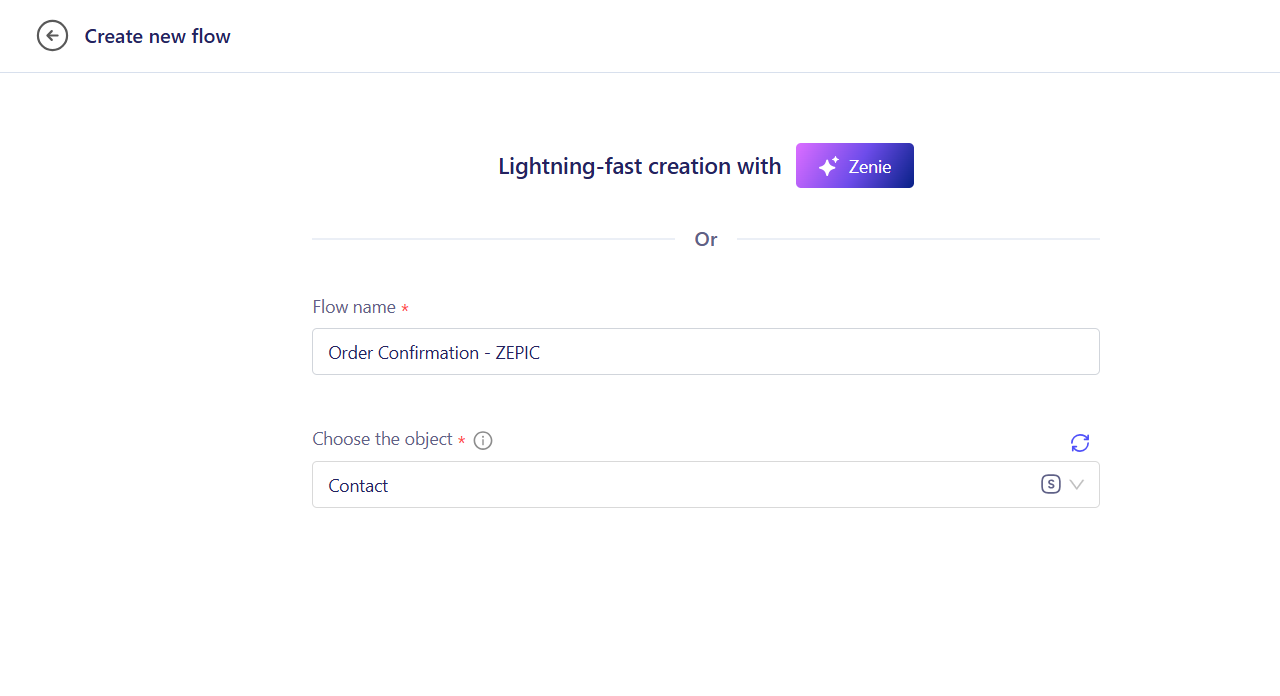
1. Start with the Original Message: Open Flows and build the journey that sends your WhatsApp or email message, starting from an event such as order fulfilled or refund issued.
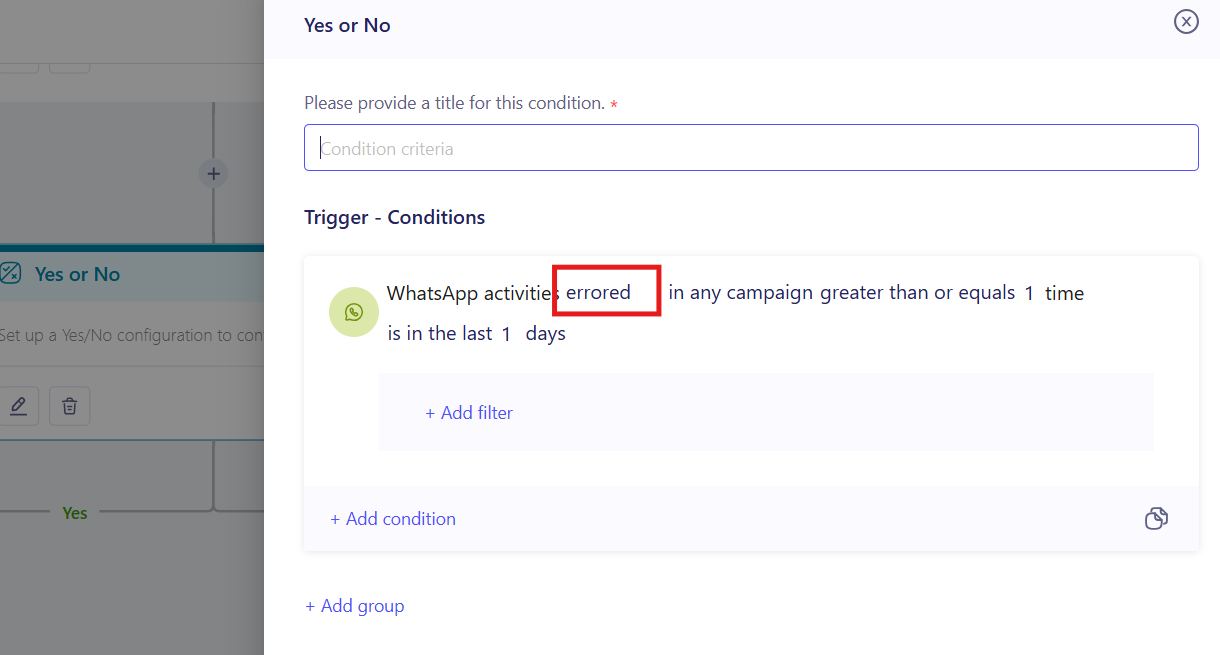
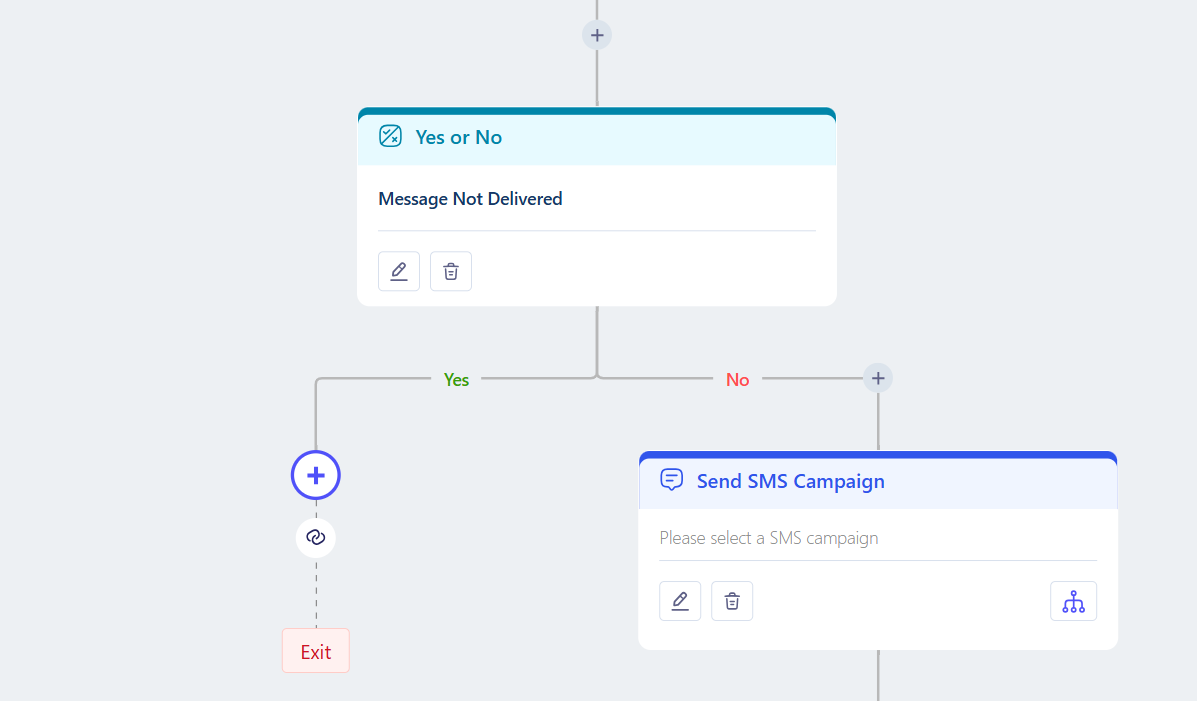
2. Add the Yes/No Condition: Add a condition that asks whether the message was delivered. Send Yes to the end of the flow and No to your SMS step (e.g., use WhatsApp errored or email bounced events for an instant fallback).’
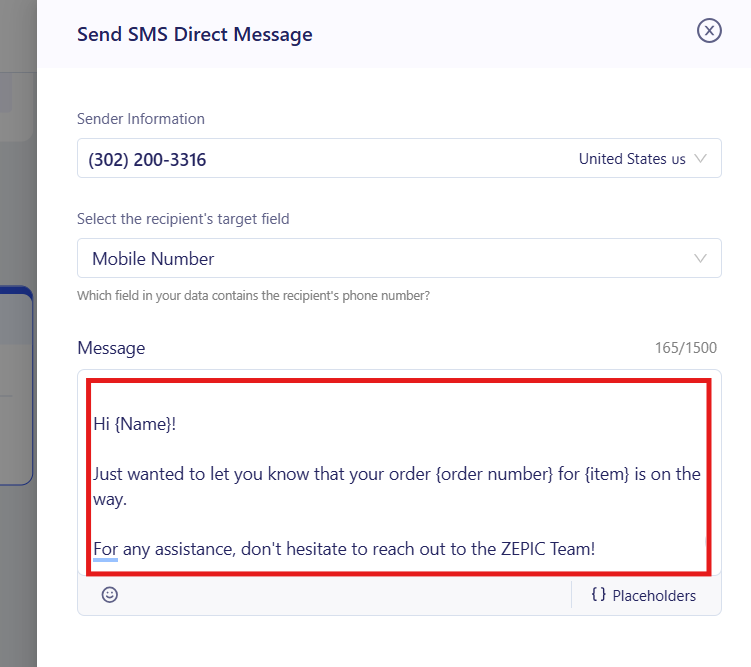
3. Add the SMS Step: Write a short message with the essential detail or campaign, such as a tracking link or refund amount, plus personalization like first name.
4. Test and Launch: Trigger a test event, confirm the SMS arrives only when the first message fails, then publish the flow to your live audience.
What to Expect After Launch
Once your backup flow is live, your business can make sure essential updates reach customers even when their first channel fails.
Your team does not need to check failed sends or chase customers by hand, meaning that undelivered messages are replaced automatically, while delivery tracking shows which channel finally reached each customer.
Backup Trigger Examples for Your Business
- • WhatsApp Message Not Delivered: A D2C brand checks an hour after sending a refund confirmation on WhatsApp, then texts the refund amount and expected credit date if it is still undelivered.
- • WhatsApp Not Read: A travel brand texts a check-in reminder to guests who have not read its WhatsApp message the day before arrival.
- • WhatsApp Unsubscribed: A hotel group sends booking status changes, like a room upgrade, by SMS to opted-in guests who have left WhatsApp, and keeps promotions out of it.
- • Email Bounced: A fashion retailer texts an order confirmation when its email bounces, and asks the customer to update their email address.
- • Email Dropped: A travel brand sends a flight schedule change by SMS when the email is dropped, so travelers can adjust their plans in time.
- • Email Not Opened: An electronics retailer texts a payment failure alert if the email stays unopened for 24 hours, so the order is not cancelled by mistake.
- • Email Unsubscribed: A subscription brand sends renewal and payment status updates by SMS to opted-in customers who have unsubscribed from email, with no promotional content.
FAQs
Can I use SMS as a backup for both WhatsApp and email?
Yes. You can add a separate yes/no condition for each channel in the same flow, or build one backup flow per channel, depending on how your journeys are set up.
Should I send promotions as a backup SMS?
No. Keep backup texts for essential updates, such as delivery, refund, and status messages. Customers who unsubscribe from one channel have not agreed to promotions on another.
Do I need coding experience to set up an SMS backup?
No. ZEPIC uses a visual Flow builder, so you can add delays, set yes/no conditions, and choose messages without writing code.
Explore Related Articles
Was this article helpful?
That’s Great!
Thank you for your feedback
Sorry! We couldn't be helpful
Thank you for your feedback
Feedback sent
We appreciate your effort and will try to fix the article