Triggered SMS Campaigns - How to Use Message Automation in ZEPIC
This guide covers how to start automated SMS campaigns in ZEPIC using triggers, so the right text reaches customers at the right moment. Triggered SMS campaigns in ZEPIC are designed to help e-commerce, D2C, and travel brands respond to customer behavior instantly, through reminders, updates, and follow-ups that run without manual effort.
Table of Contents
- • Before You Begin (Prerequisites)
- • What Are Triggered SMS Campaigns?
- • How to Set Up a Triggered SMS Campaign in ZEPIC
- • What to Expect After Launch
- • Trigger Examples for Your Business
- • FAQs
- • Explore Related Articles
Before You Begin
- • An active ZEPIC account with the SMS channel enabled and a provider connected.
- • Customers who have opted in to receive texts, with phone numbers saved in their profiles.
- • A clear goal and trigger for each automated message.
- • An SMS message ready to use, written in line with local regulations.
What Are Triggered SMS Campaigns?
A triggered SMS campaign sends a message automatically when a customer takes an action or when you choose to start a journey, so no one on your team has to press send.
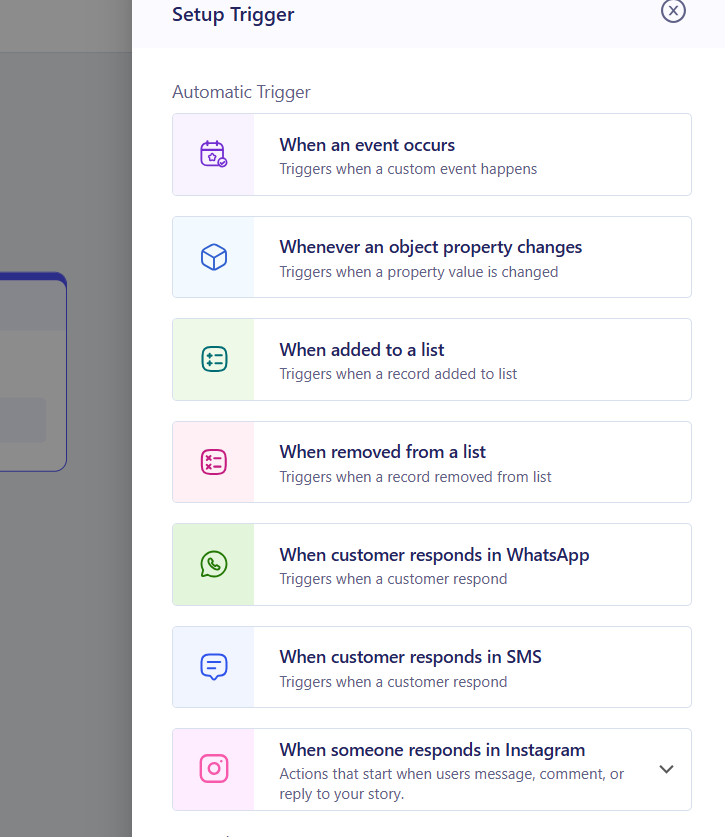
In ZEPIC, flows can start from automatic triggers: an event occurring, an object property changing, a contact being added to or removed from a list, or a customer replying on WhatsApp, SMS, or Instagram. They can also start from a manual trigger, where you add contacts from a list or segment yourself.
Events can include WhatsApp activities or form submits, and we will cover event flows in detail in another article.
How to Set Up a Triggered SMS Campaign in ZEPIC
1. Choose Your Trigger: Open Flows and select how the journey begins, either an automatic trigger or a manual one. Match it to the customer moment you want to act on (e.g., a form submit for a new enquiry).
2. Define Who Enters: Set the list, segment, or property conditions that decide who qualifies, so only relevant customers receive the text.
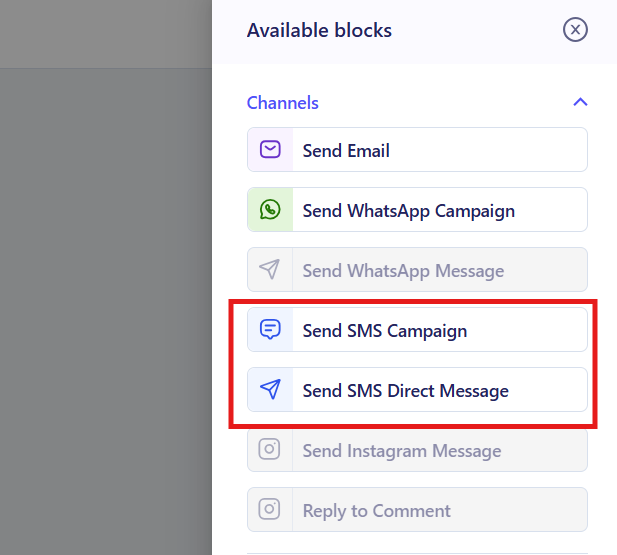
3. Add the SMS Step: Add an SMS step, select whether you want a direct message or to utilize an SMS campaign. For a direct message, write a short message with personalization such as first name or order details.
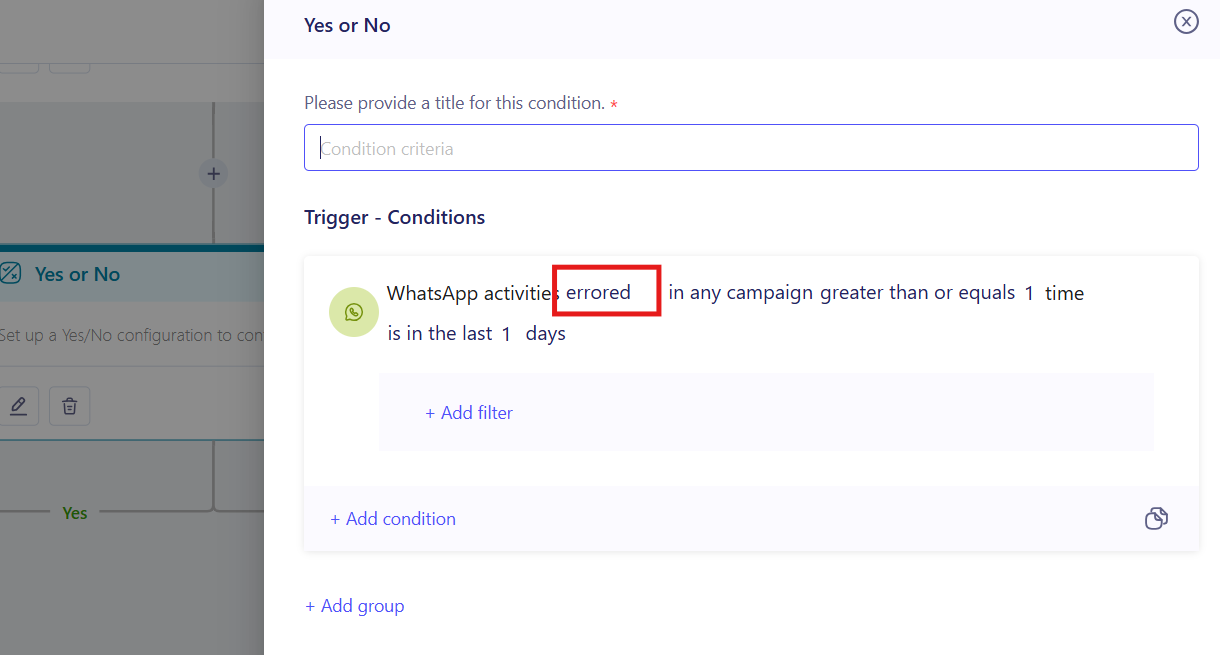
4. Add Delays and Conditions (If Needed or Required): Space out your messages and branch the journey (e.g., wait two hours, then text only customers who have not replied on WhatsApp).
5. Test and Launch: Send a test SMS to your own number to check personalization and links, then publish the flow to your live audience.
What to Expect After Launch
Once your flow is live, your business can reach customers with SMS the moment their behavior or data changes.
Your team does not need to send reminders and follow-ups by hand, meaning that every trigger starts the right message on its own, while delivery tracking shows how each campaign performed.
Trigger Examples for Your Business
- • Event Occurs: A D2C skincare brand texts a shopper who submits a sample request form, confirming the request and adding a first-order discount code.
- • Object Property Changes: A travel brand updates a booking status to Confirmed, which triggers an SMS with itinerary details and a check-in link.
- • Added to a List: A fashion retailer adds top spenders to a VIP list, and each receives a welcome text with early access to the next sale.
- • Customer Responds on WhatsApp: A tour operator sends a payment link by SMS to a traveler who replies Book on WhatsApp, so the booking moves forward on a second channel.
- • Customer Responds in SMS: An online retailer texts a shopper who replies Size to a sale message, sending a size guide and links to in-stock items.
- • Manual Addition: A resort team adds a segment of returning guests to a flow by hand, triggering an SMS invitation to a private seasonal event.
- FAQs
What is the difference between automatic and manual triggers?
Automatic triggers start a flow when something happens, such as an event, a property change, or a customer reply. Manual triggers start it when you add contacts from a list or segment yourself.
Do I need coding experience to set up a triggered campaign?
No. ZEPIC uses a visual Flow builder, so you can choose triggers, add delays, and set conditions without writing code.
Will customers who have not opted in receive these texts?
They should not. Only send to customers who have given consent, and follow local regulations on templates and opt-out options, since these rules vary by country.
Explore Related Articles
Was this article helpful?
That’s Great!
Thank you for your feedback
Sorry! We couldn't be helpful
Thank you for your feedback
Feedback sent
We appreciate your effort and will try to fix the article