Types of SMS Campaigns to Use in ZEPIC
This guide covers the main types of SMS campaigns in ZEPIC and how to choose the right one for each marketing goal. Understanding campaign types in ZEPIC is designed to help e-commerce, D2C, and travel brands match every text to the right moment, from promotions to reminders and order updates.
Table of Contents
- • Before You Begin (Prerequisites)
- • What Are the Types of SMS Campaigns in ZEPIC?
- • How to Choose and Launch the Right SMS Campaign Type
- • What to Expect After Launch
- • Matching Campaign Types to Business Goals
- • FAQs
- • Explore Related Articles
Before You Begin- • An active ZEPIC account with the SMS channel enabled.
- • A connected sender number or ID, and customers who have opted in to receive texts.
- • A clear goal for each message you plan to send.
- • Saved segments, or trigger events, ready to define who receives each campaign.
What Are the Types of SMS Campaigns in ZEPIC?
ZEPIC supports SMS campaigns for both promotional and transactional messages, and each can run as a Broadcast SMS campaign or Triggered SMS campaign.
While a one-off campaign sends one message to a chosen audience at once, a triggered campaign fires when a customer acts, such as abandoning a cart, and a flow chains messages and delays into one journey.
Choosing the right type keeps messages relevant, timely, and easy to track through the same campaign analytics.
How to Choose and Launch the Right SMS Campaign Type
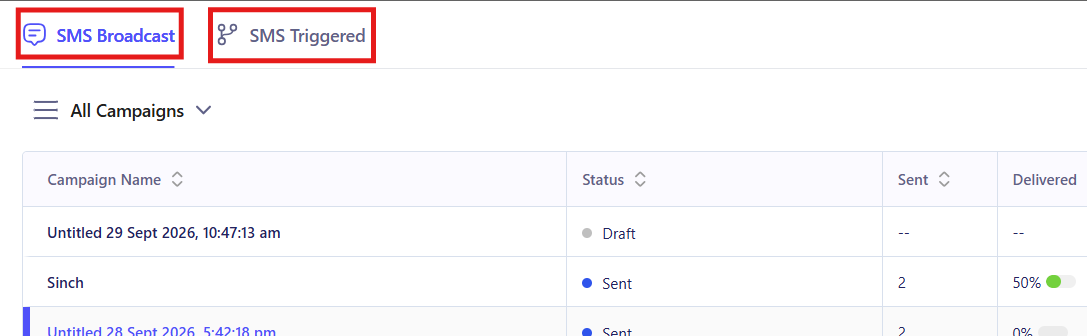
1. Define Your Goal: Decide what the message needs to achieve and how urgent it is. Announcements and sales suit a one-off send, while behavior-based messages suit a trigger (e.g., a reminder after a cart is abandoned, or a confirmation after an order).
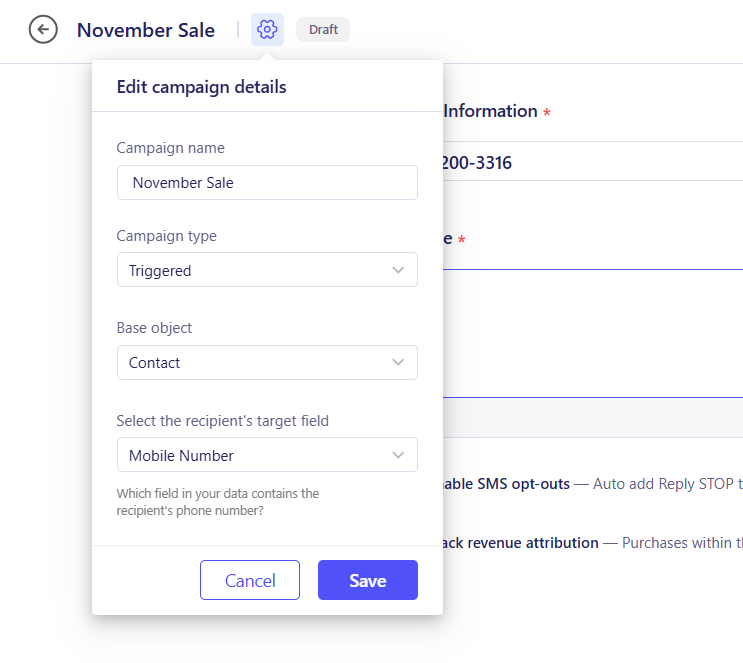
2. Pick the Campaign Type: Open Campaigns and choose a Broadcast one-off campaign for a single send. For a Triggered campaign with event-based messages, you will need to use ZEPIC Flows for multi-step journeys.
3. Choose Who Gets It: Select a saved segment for one-off sends, or set the trigger for automated campaigns. For trigger-based campaigns, you will have to select the Trigger and customize it in ZEPIC flows.
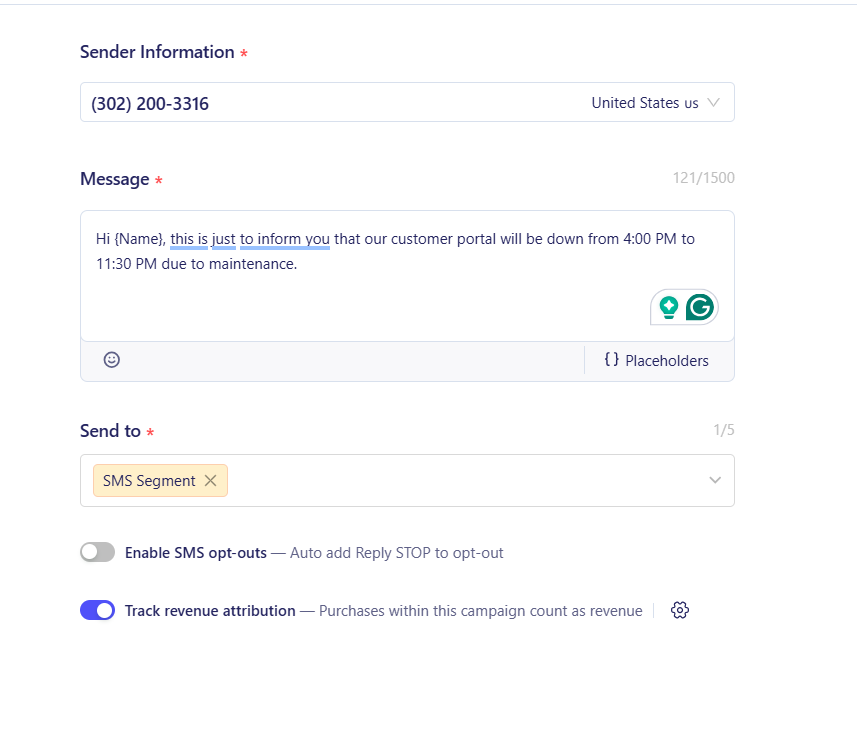
4. Write and Time the Message: Draft a short text with personalization such as first name or order value. Schedule one-off sends for a specific time, and add delays or conditions for automated ones (e.g., send an order update once a purchase is confirmed).
5. Test and Launch: Send a test SMS to your own number to verify the sender, personalization, and links before publishing, then review results in your campaign analytics.
What to Expect After Launch
Once each message matches the right campaign type, your business reaches customers at the right moment.
Your team does not need to send every text manually, meaning that promotions go out on schedule, reminders and updates fire automatically, and delivery tracking shows how each campaign type performs.
Matching Campaign Types to Business Goals
- • One-Off Campaigns for Promotions: A home décor retailer texts opted-in past buyers about a weekend sale, sending one message to a chosen segment at a scheduled time. Delivery tracking then shows how the offer landed.
- • Triggered Campaigns for Behavior: A D2C food brand sends an SMS reminder with a checkout link when a customer leaves items in their cart. The message fires automatically, with no manual effort from the team.
- • Transactional Campaigns for Updates: An online retailer sends order confirmations and delivery updates as soon as each event occurs. Customers stay informed, and the team avoids answering routine status queries.
- • Flow-Based Journeys: A hotel group enrolls guests in a flow that confirms their booking by SMS, reminds them a day before arrival, and offers airport transfers or spa add-ons. Guests who do not respond receive a WhatsApp or email follow-up, with each step timed by delays and conditions.
FAQs
Can I use more than one campaign type at the same time?
Yes. Many brands run one-off promotions alongside triggered reminders and flows, and use segments and conditions to prevent customers from receiving overlapping messages.
Is a one-off campaign the right choice for promotions?
Yes. It sends a single message to a chosen segment at a set time, which suits sales, launches, and other time-limited offers.
Do promotional and transactional texts follow the same rules?
No. Promotional texts need clear opt-in consent and often an opt-out option, while transactional texts cover order and account updates. Local regulations vary, so keep each type on its own sender and template.
Explore Related Articles
Was this article helpful?
That’s Great!
Thank you for your feedback
Sorry! We couldn't be helpful
Thank you for your feedback
Feedback sent
We appreciate your effort and will try to fix the article