How to Segment Audiences for SMS Campaigns in ZEPIC
This guide covers how to build audience segments in ZEPIC, so every SMS campaign reaches the customers it is actually meant for. Segmentation for SMS in ZEPIC is designed to help e-commerce, D2C, and travel brands target by behavior, properties, and activity across channels, instead of texting an entire contact list.
Table of Contents
- • Before You Begin (Prerequisites)
- • What Is Audience Segmentation for SMS?
- • How to Segment Audiences for SMS Campaigns in ZEPIC
- • What to Expect After Launch
- • Segmentation Examples for Your Business
- • FAQs
- • Explore Related Articles
Before You Begin
- • An active ZEPIC account with the SMS channel enabled and a provider connected.
- • Customer data in ZEPIC, such as properties, purchase history, or activity on other channels.
- • Customers who have opted in to SMS, with phone numbers saved in their profiles.
- • A clear goal for who each campaign should reach.
What Is Audience Segmentation for SMS?
A segment is a group of contacts in ZEPIC that share something in common, such as a purchase, a location, or an action taken on another channel, built using AND/OR conditions instead of a static list. For SMS, segmentation matters because it keeps messages relevant and reduces opt-outs, since a customer who bought once last month expects a different text than a customer who has browsed for weeks without buying.
Segments built from properties, behavior, or activity on channels like Instagram can all feed the same SMS campaign or flow.
How to Segment Audiences for SMS Campaigns in ZEPIC
1. Navigate to Segments: Decide what the SMS campaign needs to achieve, so you know which customers belong, and create the segment. This can be based on SMS activities, location, or custom events.
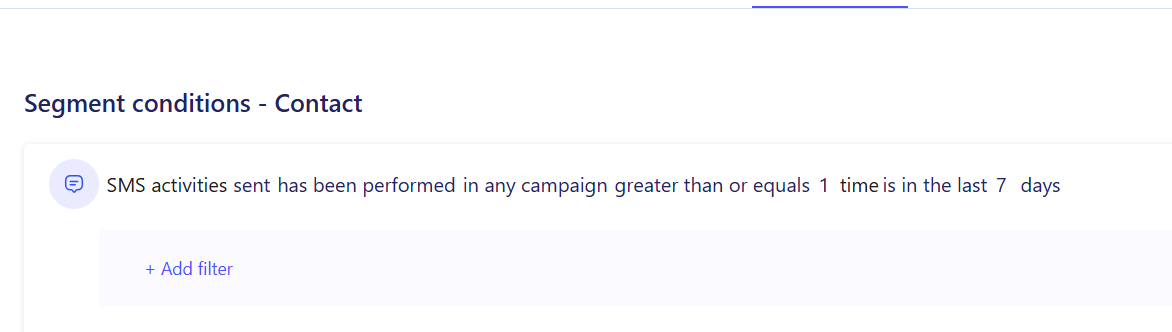
2. Choose Your Conditions or filters: After selecting the main Segments and build conditions using properties or events, such as location or spend, and behavior, such as purchases, cart activity, or replies on WhatsApp, SMS, or Instagram.
3. Combine Conditions with AND/OR: Narrow or widen the segment by combining conditions (e.g., customers in a city AND who bought in the last 30 days).
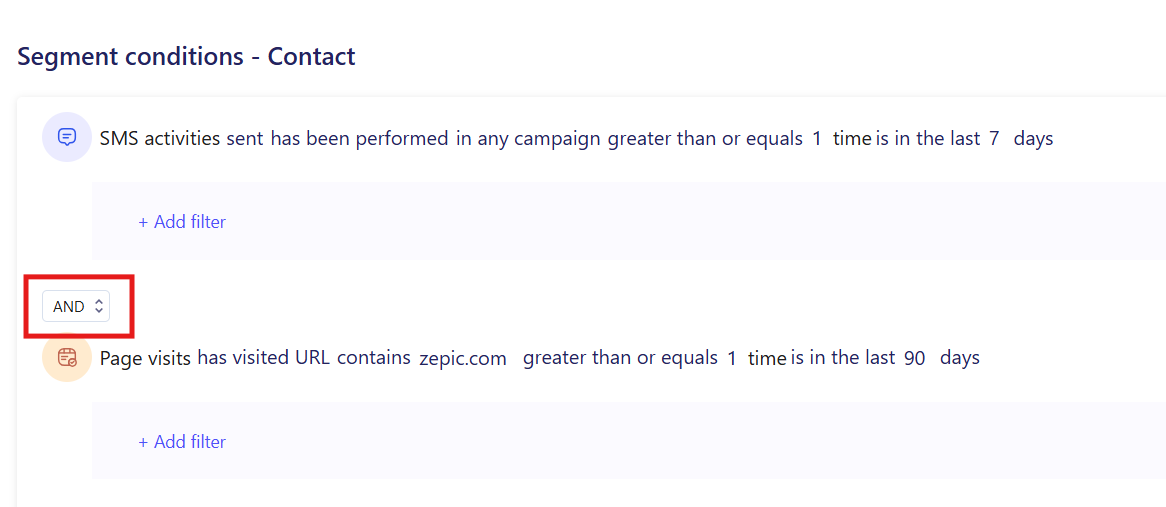
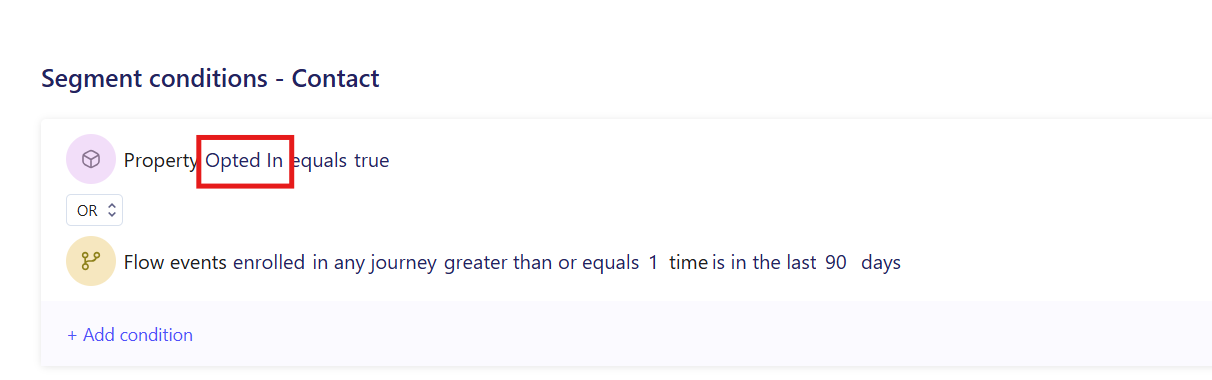
4. Confirm SMS Opt-In: Add a condition that keeps the segment to contacts who have opted in to SMS and have a valid phone number, so the campaign only reaches eligible customers.
5. Save and Use the Segment: Save the segment, then select it in your SMS campaign or flow, and review its size before you send.
What to Expect After Launch
Once your segments are set up, your business can send SMS campaigns built around who a customer is and what they have done, not just their phone number.
Your team does not need to build a new list for every send, meaning that saved segments stay ready to reuse, while delivery tracking shows how each targeted campaign performed.
Segmentation Examples for Your Business
- • Purchase-Based Segments: A D2C skincare brand segments customers who bought a specific product 30 days ago, then texts a restock reminder with a repeat-order link.
- • Location-Based Segments: A retail chain segments customers near a specific store, then sends an SMS about an in-store event only to that city.
- • Engagement-Based Segments: A fashion retailer segments shoppers who clicked a sale email but did not purchase, then follows up with an SMS discount code to close the sale.
- • Cross-Channel Activity Segments: A travel brand segments followers who engaged with a destination post on Instagram, then texts them a limited-time fare for that route, combining social interest with a direct, trackable channel.
FAQs
Can I use the same segment for SMS and other channels?
Yes. A segment built in ZEPIC can be used across SMS, email, and WhatsApp campaigns, as long as contacts have opted in to the channel you choose.
Can I segment customers based on Instagram activity?
Yes. You can build segments from actions taken on Instagram, such as replies or engagement, and use them to trigger an SMS or any other channel.
Do I need coding experience to build a segment?
No. ZEPIC uses a visual segment builder with AND/OR conditions, so you can combine properties and behavior without writing code or SQL.
Explore Related Articles
Was this article helpful?
That’s Great!
Thank you for your feedback
Sorry! We couldn't be helpful
Thank you for your feedback
Feedback sent
We appreciate your effort and will try to fix the article