How to Assign Tickets to Agents Using Round Robin in ZEPIC
This guide covers how to assign tickets to agents using round robin in ZEPIC, so every customer reply reaches someone and no agent is overloaded.
Round robin assignment in ZEPIC is designed to help e-commerce, D2C, and travel brands share customer replies fairly across support and sales teams, without a manager assigning each one by hand.
TABLE OF CONTENTS
- Before You Begin
- What Is Round Robin Assignment?
- How to Set Up Round Robin Assignment in ZEPIC
- What to Expect After Launch
- Ticket Assignment Use Cases for Your Business
- FAQs
- Explore Related Articles
Before You Begin
An active ZEPIC account with at least one channel enabled, such as email, SMS, or WhatsApp.
Agents or teams added to your ZEPIC workspace, with access to the Team Inbox.
Customers who can reply to your messages on the channel you plan to use.
A clear idea of which replies should go to support and which to sales.
What Is Round Robin Assignment?
Round robin assignment is a method in ZEPIC that hands each new customer reply to the next agent in a rotating order, so every agent receives an equal share of tickets over time.
The flow is triggered when a customer replies to an email, SMS, or WhatsApp message, then assigns the task using the method you choose: a specific agent, a team, at random, or round robin.
Round robin suits teams where any agent can handle any reply, since it keeps workloads even for both support agents and sales team members.
How to Set Up Round Robin Assignment in ZEPIC
Open Flows: Navigate to Flows in ZEPIC and create a new flow, or edit an existing one that already sends the messages your customers reply to.
Set the Trigger - Reply Trigger or Conversation Status change trigger:
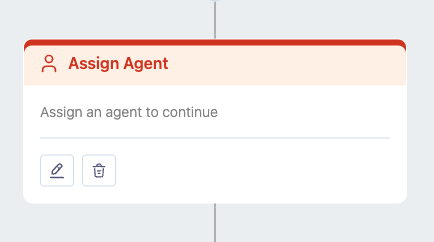
Choose a customer reply as the trigger or Conversation Status change trigger, on the channel you want to cover, such as email, SMS, or WhatsApp (e.g., a reply to an order update text).Add the Assignment Step:
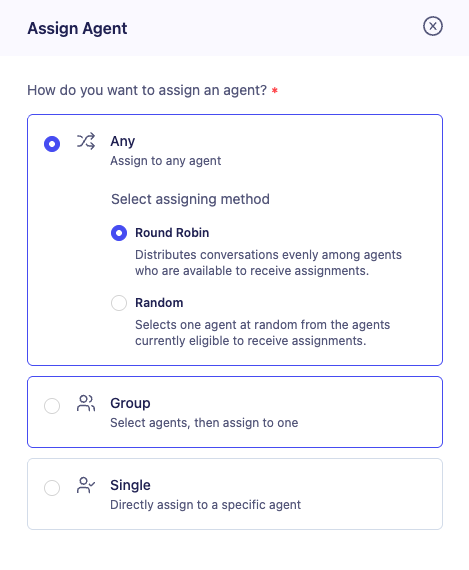 Add a step that assigns the conversation as a task, so the reply lands with an agent instead of waiting in the queue.
Choose Round Robin:
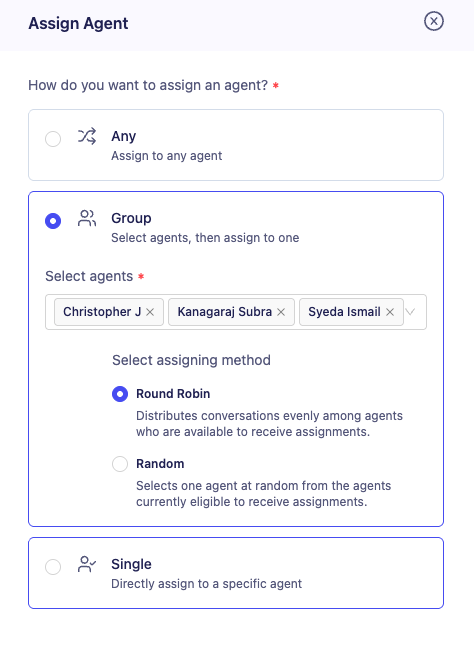 Select round robin as the method, then pick the agents or team who should share the tickets, so each new reply goes to the next person in line.
Test and Launch: Send a few test replies, confirm they rotate across your agents, then publish the flow to your live audience.
What to Expect After Launch
Once your round robin flow is live, your business can share every customer reply equally across your support and sales teams.
Your team does not need to decide who picks up each new reply, meaning that tickets are assigned the moment a customer responds, while the rotation keeps workloads fair and response times steady.
Ticket Assignment Use Cases for Your Business
Support Replies Shared Equally: A D2C skincare brand assigns replies to its order update texts across its support team by round robin, so no single agent is buried on a busy sale day.
Sales Leads from Promotions: A fashion retailer rotates WhatsApp replies to a launch campaign across its sales team, so every interested customer gets a fast response and every rep gets equal opportunities.
Specific Agent for Existing Guests: A travel agency assigns email replies from guests with an upcoming trip to the agent already handling their booking, while new enquiries rotate across the wider team.
Team-Based Routing for Returns: An electronics retailer assigns replies about returns and warranty to a dedicated team, so specialists handle the questions that need product knowledge.
FAQs
What is the difference between round robin and random assignment?
Round robin passes tickets in a fixed rotation, so each agent gets an equal share over time. Random assignment picks an agent by chance, so the split can be uneven in the short term.
Can I use round robin for email, SMS, and WhatsApp replies?
Yes. You can set the trigger on a reply from any of these channels, then assign it using round robin, a specific agent, a team, or at random.
Do I need coding experience to set up a round robin assignment?
No. ZEPIC uses a visual Flow builder, so you can set the trigger, choose the assignment method, and select your agents without writing code.
Explore Related Articles
Was this article helpful?
That’s Great!
Thank you for your feedback
Sorry! We couldn't be helpful
Thank you for your feedback
Feedback sent
We appreciate your effort and will try to fix the article