How do I re-engage with WhatsApp contact after 24h expiry?
Start a follow-up workflow after a qualifying transition to Expired.
Recommended Settings
Example
After a qualifying WhatsApp expiry, the flow updates the contact’s follow-up status and sends an approved template where required.
Selecting Expired listens for qualifying expiry events; it does not create an expiry timer or cause conversations to expire.
Configure and Activate the Flow
Create a new Flow with Contact object
Add the Conversation Status Change trigger.
Apply the recommended settings above.
Connect the trigger to the required workflow actions.
Validate the flow, resolve configuration errors, and launch it.
Only the Active flow’s launched definition is used for enrollment. Publish draft changes before expecting them to affect the running flow.
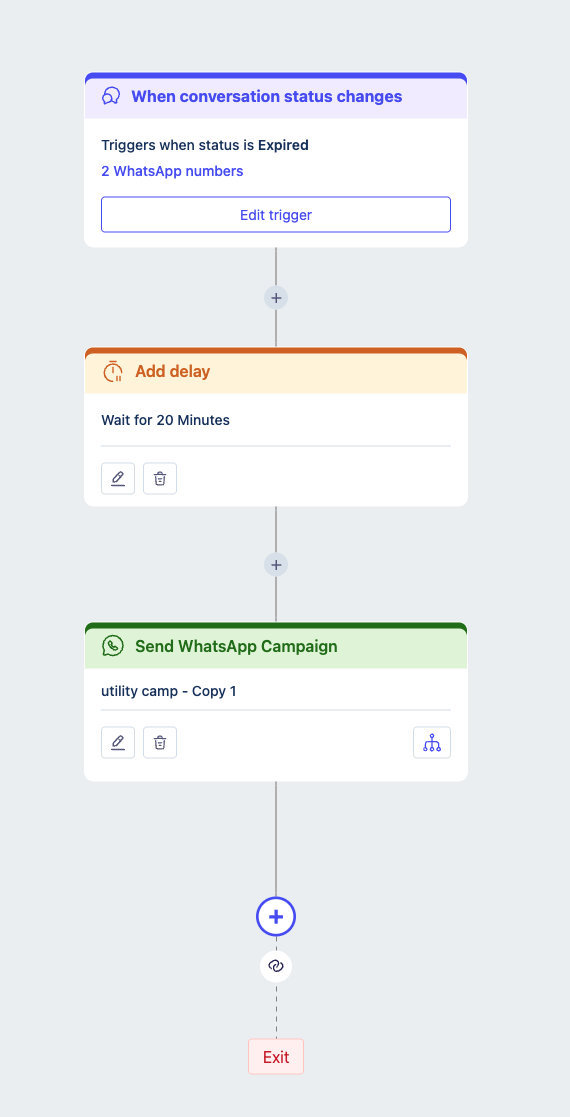
Sample flow
Here we add a delay of 20 minutes and then send a WhatsApp campaign with Utility template.
Was this article helpful?
That’s Great!
Thank you for your feedback
Sorry! We couldn't be helpful
Thank you for your feedback
Feedback sent
We appreciate your effort and will try to fix the article