Using Two-Way Messaging for SMS on ZEPIC
Two-way SMS in ZEPIC is designed to help e-commerce, D2C, and travel brands turn a one-way text into a conversation, without asking customers to switch to another app.
This guide covers how to set up two-way SMS messaging in ZEPIC, so customer replies reach your team or move a flow forward automatically.
Table of Contents
- • Before You Begin (Prerequisites)
- • What Is Two-Way SMS Messaging?
- • How to Set Up Two-Way SMS in ZEPIC
- • What to Expect After Setup
- • Two-Way SMS Use Cases for Your Business
- • FAQs
- • Explore Related Articles
Before You Begin- • An active ZEPIC account with the SMS channel enabled and a provider connected.
- • A sender number capable of receiving replies, confirmed with your SMS provider.
- • Customers who have opted in to SMS, with phone numbers saved in their profiles.
- • A team inbox or flow ready to handle incoming replies.
What Is Two-Way SMS Messaging?
Two-way SMS messaging lets customers reply to a text instead of only receiving one, so a conversation can continue on the same channel where it started.
In ZEPIC, an incoming SMS reply can land in the team inbox for an agent to answer, trigger an automated reply, or move a customer forward in a flow, similar to how WhatsApp and Instagram replies are handled.
This keeps simple questions and confirmations off the phone and email queue, while still letting a human step in when needed.
How to Set Up Two-Way SMS in ZEPIC
1. Confirm Your Number Supports Replies: Check with your connected SMS provider, ICS Mobile or Twilio, that your sender number or ID can receive inbound texts, not only send them.
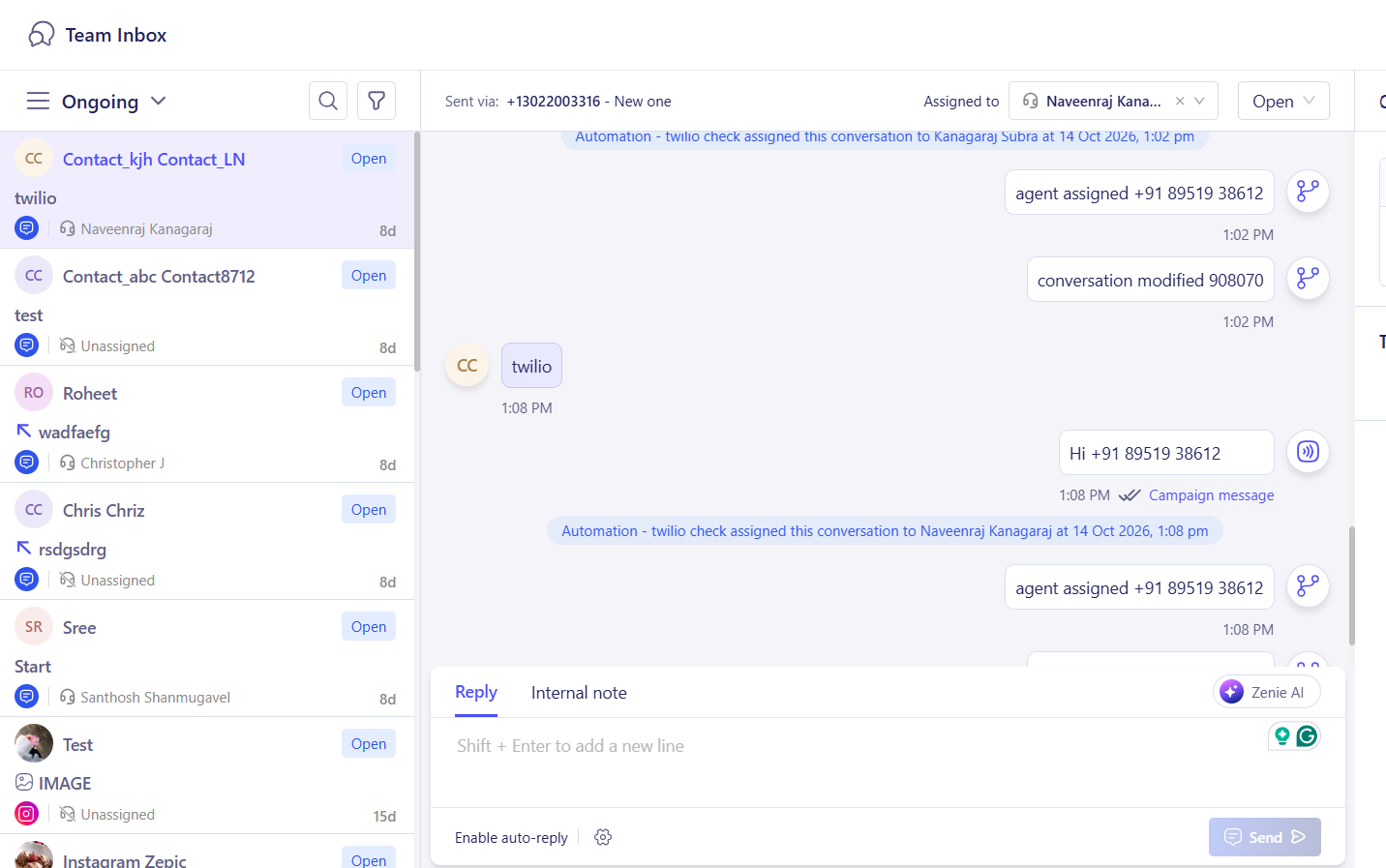
2. Reply in Your Team Inbox: Open your Team Inbox to reply; incoming replies appear alongside WhatsApp and Instagram conversations, but you can filter.
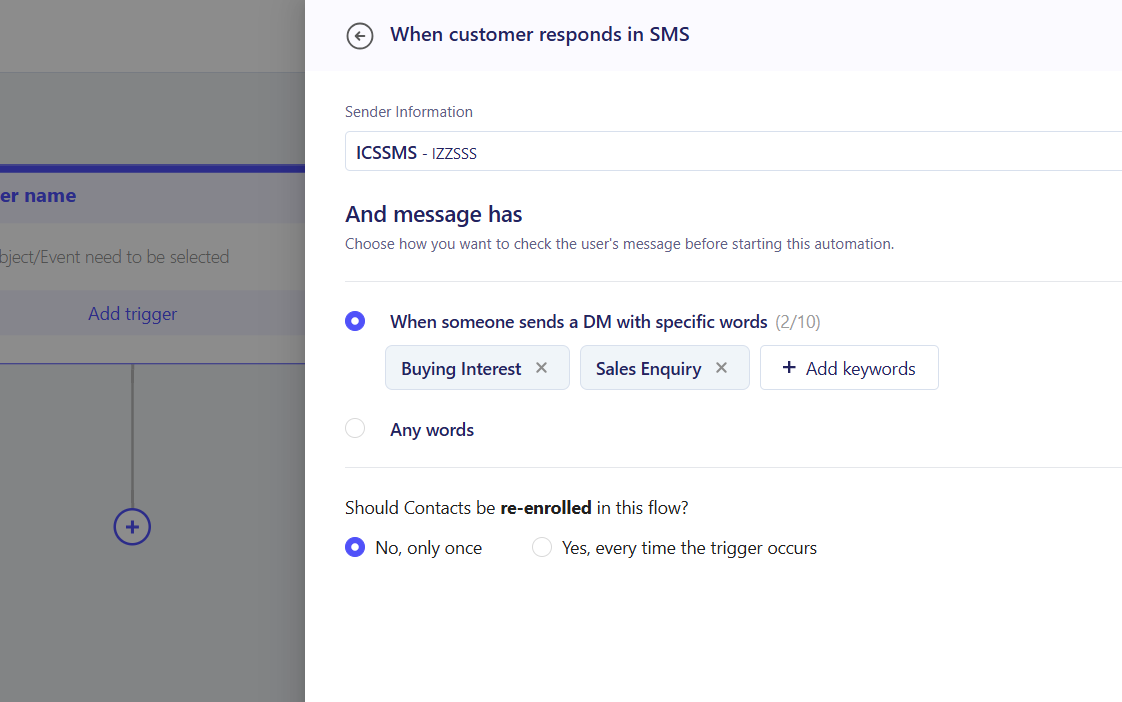
3. Set Up Automated Replies: Add keyword-based or automatic responses for common replies (e.g., a customer who texts Enquiry is tagged and added to team inbox automatically).
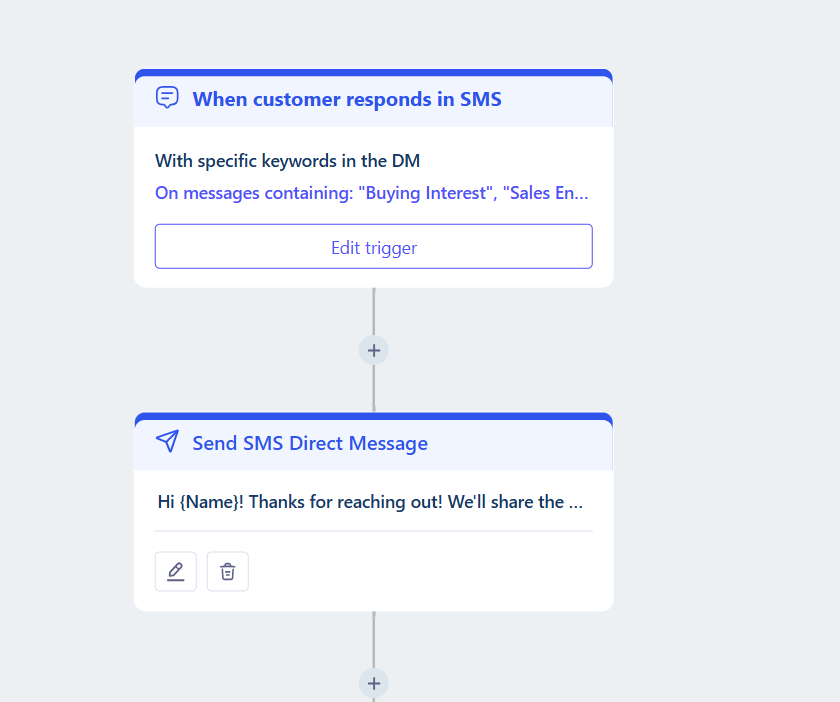
4. Connect Replies to a Flow: Add a Wait for Reply step in Flows where a customer's answer should decide what happens next, such as confirming a delivery time.
5. Test and Launch: Send a test SMS, reply from your own number, and confirm it reaches the inbox or flow correctly before opening the number up to customers.
What to Expect After Setup
Once two-way SMS is set up, your business can let customers reply directly instead of calling or emailing for simple answers.
Your team does not need to monitor a separate inbox for texts, meaning that replies land where your team already works, while flows handle the ones that do not need a person.
Two-Way SMS Use Cases for Your Business
- • Delivery Confirmations: An online retailer texts a delivery window and asks the customer to reply Yes to confirm or Reschedule to pick another time, moving the flow forward based on the answer.
- • Appointment and Booking Changes: A travel agency texts a booking reminder and lets guests reply Change to request a new date, which routes the message to an agent in the team inbox.
- • Quick Customer Support: A D2C brand lets customers reply to an order update with a question, which an agent answers directly from the team inbox instead of asking the customer to email in.
- • Opt-Out Handling: A retail chain automatically unsubscribes any customer who replies Stop to a promotional text, keeping its SMS list compliant without manual review.
- FAQs
Do SMS replies appear in the same inbox as WhatsApp and Instagram?
Yes. Once connected, SMS replies can appear in the same team inbox as your other channels, so agents do not need to check multiple places.
Can I automate replies to common SMS keywords?
Yes. You can set up automatic responses for keywords such as Stop or Yes, so common replies are handled without an agent.
Do I need coding experience to set up two-way SMS?
No. Connecting your inbox and building reply-based flows uses ZEPIC's visual tools, without writing code.
Explore Related Articles
Was this article helpful?
That’s Great!
Thank you for your feedback
Sorry! We couldn't be helpful
Thank you for your feedback
Feedback sent
We appreciate your effort and will try to fix the article