Setting Up Abandoned Checkout Automation in ZEPIC Flows
This guide covers how to trigger automated recovery messages in ZEPIC the moment a customer enters checkout but leaves before completing payment. Checkout recovery flows in ZEPIC are designed to help e-commerce, D2C, and travel brands win back near-complete sales instantly, without a team member tracking drop-offs by hand.
Table of Contents
- • Before You Begin (Prerequisites)
- • What Is an Abandoned Checkout Flow?
- • How to Automate Checkout Recovery in ZEPIC
- • What to Expect After Launch
- • Checkout Recovery Use Cases for Your Business
- • FAQs
- • Explore Related Articles
Before You Begin
- • An active ZEPIC account with at least one channel enabled, such as email, SMS, or WhatsApp.
- • Your Shopify store connected to ZEPIC, or another source sending checkout data through a webhook.
- • Checkout Started and Order Confirmed events tracked and flowing into ZEPIC.
- • A recovery message ready, with any discount code or next step you want to include.
What Is an Abandoned Checkout Flow?
An abandoned checkout flow is a journey in ZEPIC that starts the moment a customer enters checkout, usually once they have given an email or shipping details, and ends without payment, so the reminder goes out without anyone needing to send it manually.
This differs from a cart abandonment, where a customer never reaches checkout at all. A checkout abandonment is further down the funnel, since the customer has already shared contact details, which makes the message easier to personalize and the sale more likely to close.
Once triggered, the flow can send a single reminder or lead into a longer series that escalates the offer if the customer still does not complete the order.
How to Automate Checkout Recovery in ZEPIC
1. Connect Your Checkout Source: Connect your Shopify store to ZEPIC, or confirm the webhook you are using sends Checkout Started and Order Confirmed events as they happen.
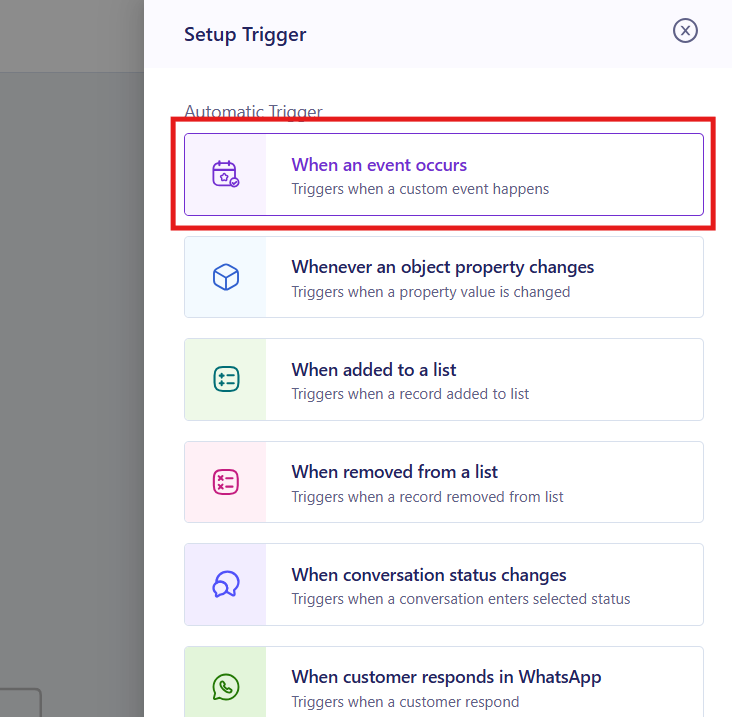
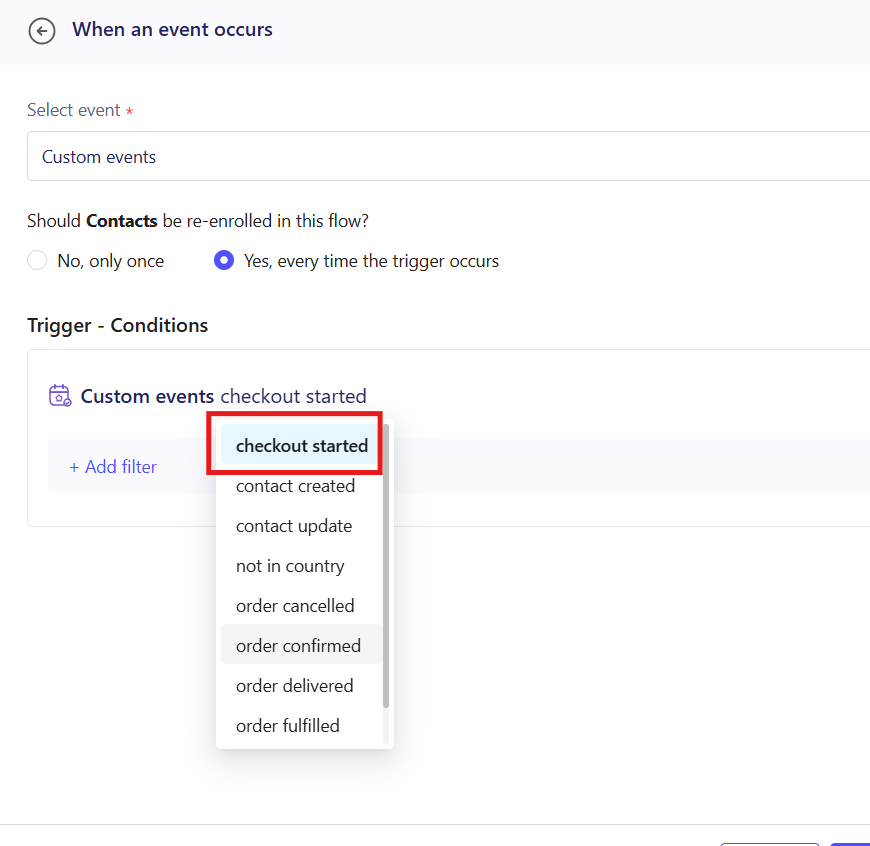
2. Set Your Flow Trigger: Open Flows and choose Checkout Started as the event that starts the journey, then add a condition that checks whether Order Confirmed fired before the wait period ends.
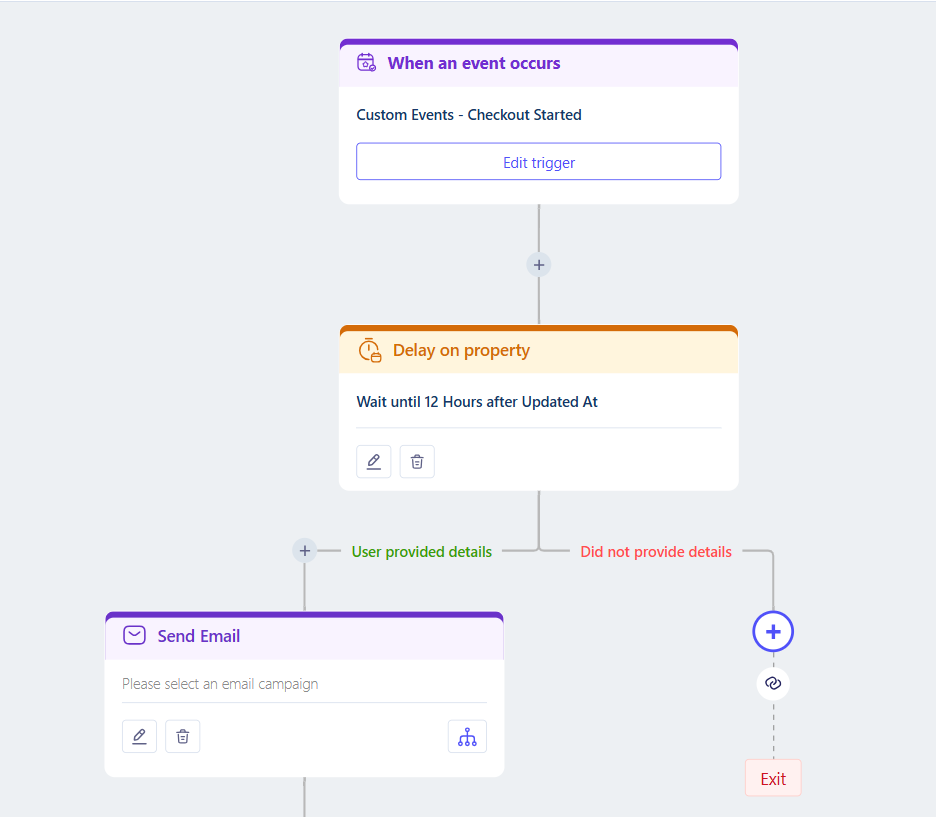
3. Add a Wait Period: Add a delay before the first reminder, such as 30 mins or, depending on how low-pressure you want it to be even 12 hours, so customers who are still completing payment are not messaged too soon.
4. Build the Recovery Message: Add a step for your first channel, with personalization such as first name and the order total, and include a direct link back to checkout.This can even be an email or WhatsApp cart recovery campaign prepared in advance.
5. Test and Launch: Trigger a test checkout abandonment, confirm the message arrives correctly, then publish the flow to your live audience.
What to Expect After Launch
Once your checkout recovery flow is live, your business can reach every customer who stops short of completing payment.
Your team does not need to track incomplete checkouts or send the first reminder by hand, meaning that every near-complete order gets a timely message, while delivery tracking shows how each reminder performed.
Checkout Recovery Use Cases for Your Business
- • First Reminder with Order Details: A D2C skincare brand sends an email 30 minutes after checkout is abandoned, listing the items and total still waiting for payment.
- • Payment Failure Follow-Up: A fashion retailer texts customers whose payment failed at checkout, with a direct link to retry without re-entering their details.
- • Shipping Cost Objection: A home décor brand follows up on WhatsApp with a free shipping code for customers who abandon checkout once shipping costs are shown.
- • High-Value Order Escalation: A travel agency calls out a near-complete, high-value booking by sending an SMS directly, since a booking that far along is worth a faster, more direct nudge.
FAQs
How is checkout abandonment different from cart abandonment?
Cart abandonment happens before checkout begins, while checkout abandonment happens after a customer has entered checkout and often shared contact details, which makes the message more personal.
Does checkout recovery only work with Shopify?
No. Shopify is the most common source, but the same flow can trigger from any other webhook that sends Checkout Started and Order Confirmed events into ZEPIC.
Do I need coding experience to set up a checkout recovery flow?
No. ZEPIC uses a visual Flow builder, so you can choose triggers, add conditions, and build messages without writing code.
Explore Related Articles
Was this article helpful?
That’s Great!
Thank you for your feedback
Sorry! We couldn't be helpful
Thank you for your feedback
Feedback sent
We appreciate your effort and will try to fix the article