WhatsApp Carousels in ZEPIC - Add Visual Cards to Your WhatsApp Messages
WhatsApp Carousels in ZEPIC let you attach a series of visual cards directly to your WhatsApp messages.
This means a single WhatsApp message can showcase multiple products, promotions, or actions at once, without pushing your contact to a separate link or another channel to find out more.
Here is how Carousels work in ZEPIC and how to get them set up.
How Do WhatsApp Carousels Work in ZEPIC?
WhatsApp Carousels in ZEPIC are built on top of your already approved WhatsApp message templates.
Once your message template gets the green light, you can go ahead and attach up to 10 individual image cards to it, each one carrying its own visual and its own CTA button.
The carousel goes out as part of the message itself, so the recipient can swipe through your cards right there inside WhatsApp, without having to leave the conversation at all.
- •Each card holds its own static image or video, so you can mix up your visuals across the carousel to keep things engaging all the way through.
- •On top of that, you can pull in contact attributes to personalise both the message copy and the CTA text that leads to a link of your choice.
Note: Footer is not supported for WhatsApp carousels.
Setting Up WhatsApp Carousels: Step-by-Step
Getting a Carousel up and running in ZEPIC is straightforward once your WhatsApp template is approved and ready to go. Here is how to get it done:
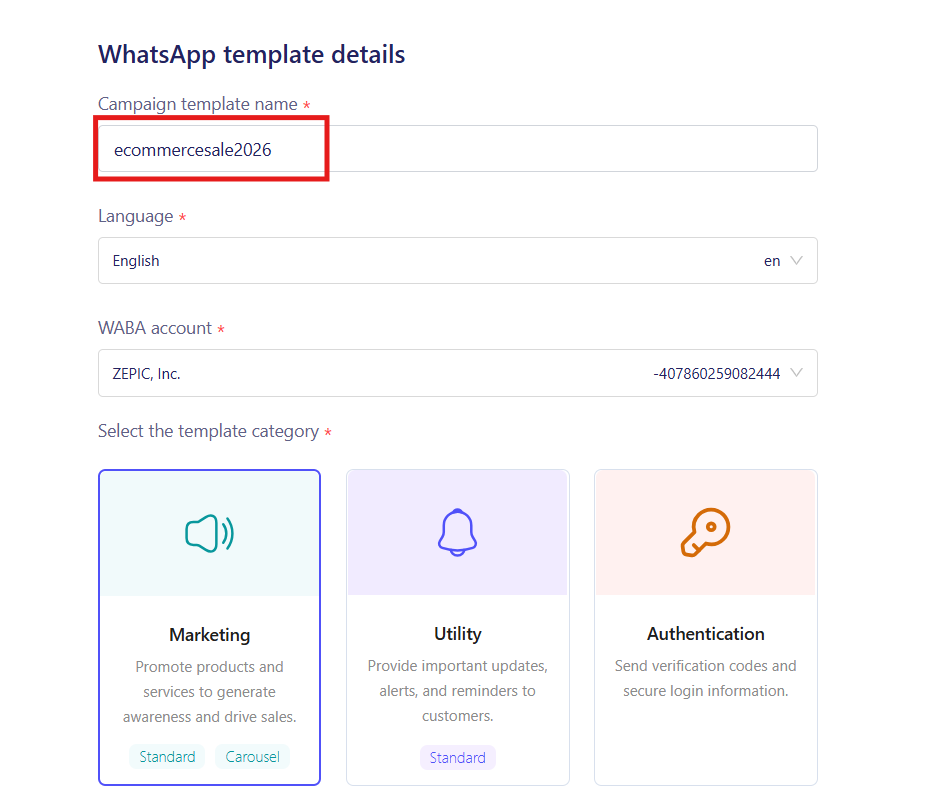
- 1. Head into your WhatsApp Campaigns section in ZEPIC and create a new template that you want to build your Carousel on top of.
2. Look for the Carousel option within the campaign or flow builder and switch it on for that message.
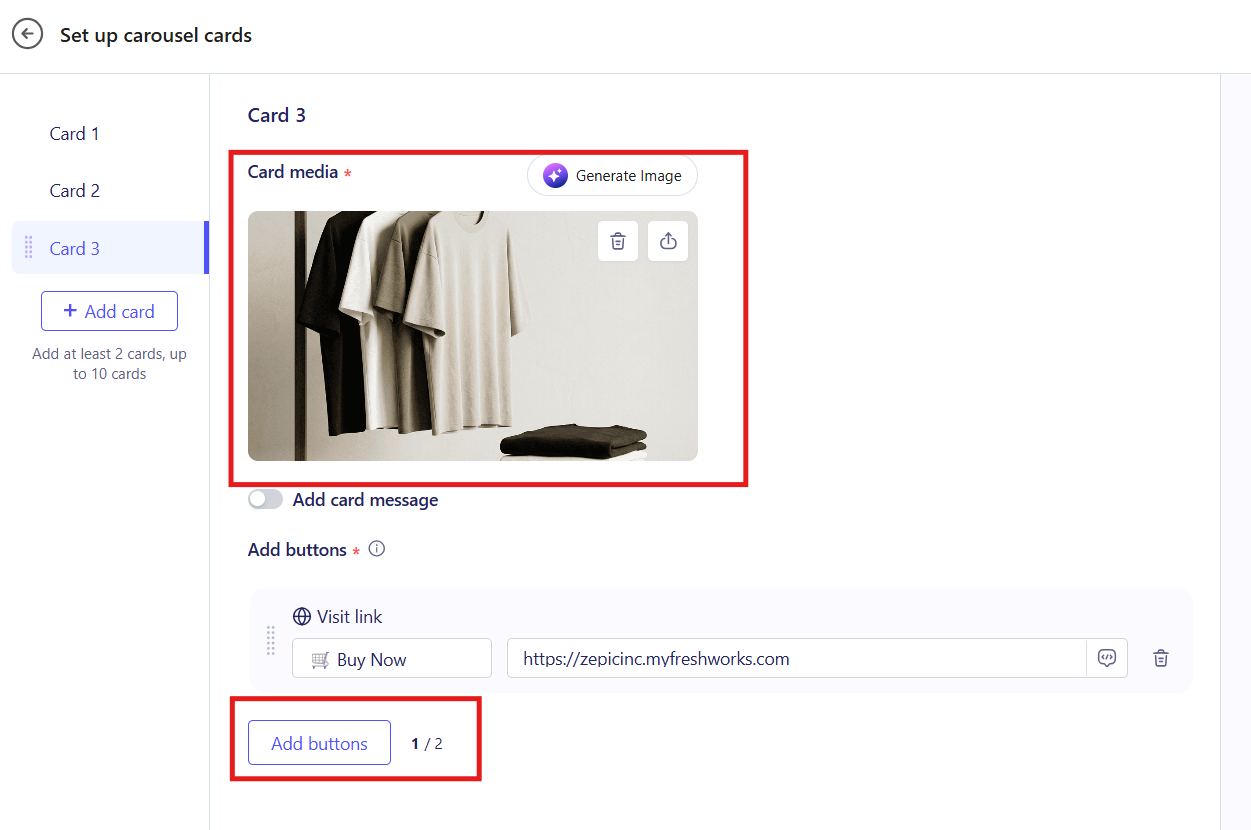
- 3. Add your first card by uploading a static image or a video and filling in the CTA text and destination link for that card.
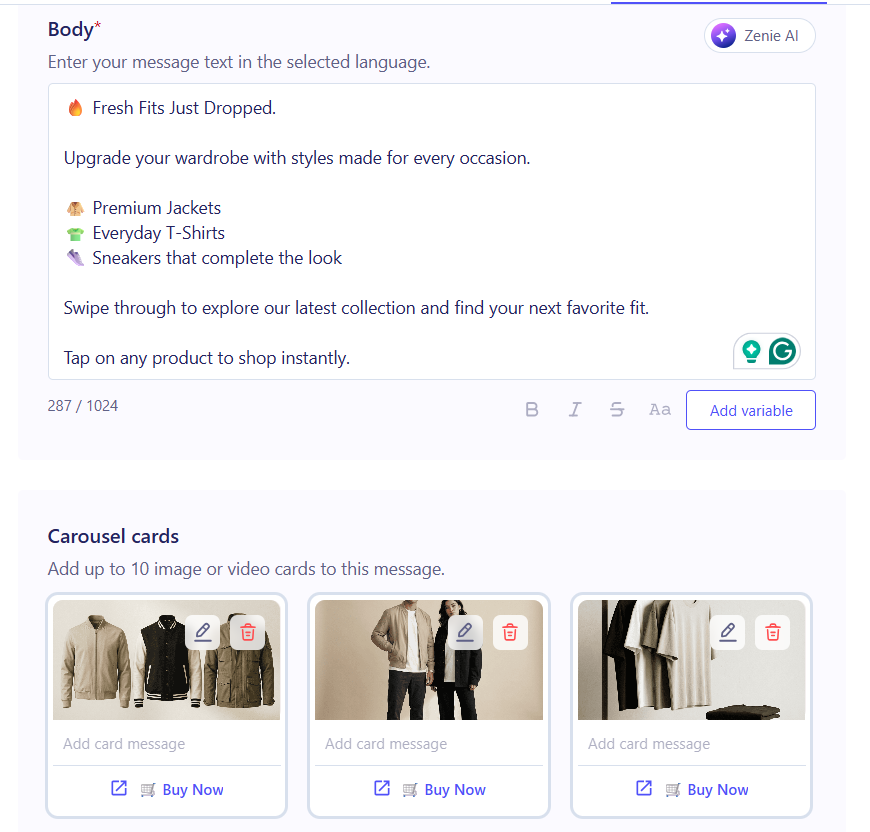
- 4. Keep adding cards, one at a time, until you have built out all the cards you need. Remember, you can add up to 10 in total.
- 5. Where you want to personalise, go ahead and drop in the relevant contact attributes for the message body or the CTA text on any card.
Save your setup and attach the Carousel to a Broadcast, a Flow, or a trigger-based message, depending on how you want it to go out.
Why WhatsApp Carousels Belong in Your Campaign Mix
A single static WhatsApp message can only do so much. What happens when you want to show a new collection, walk someone through a service menu, or push three different promotions in one go? That is exactly where Carousels come in:
- •More in One Message: Pack multiple products, offers, or actions into a single send instead of following up with message after message to get the same point across.
- •Personalisation at Scale: Use contact attributes to swap in names, locations, preferences, or any other data point you hold, right inside the card copy and CTA text.
- •Richer Visual Storytelling: Move beyond plain text and bring your brand to life with images or videos that your contacts can scroll through at their own pace, all within the chat.
Use Cases: Broadcast, Flows, and Trigger-Based Messages
WhatsApp Carousels work across all the main ways you send messages in ZEPIC. Here is a look at how each one can put them to good use:
| Message Type | Carousel Use Case |
|---|---|
| Broadcast Messages | Send a seasonal sale or new collection announcement to your full contact list, with each card in the Carousel highlighting a different product or category and linking out to its own page. |
| ZEPIC Flows | Drop a Carousel into a conversational Flow to walk contacts through a product menu or a service selection, letting them pick what they want by tapping the CTA on the relevant card. |
| Trigger-Based Messages | Fire off a personalized Carousel automatically when a contact hits a specific trigger, like browsing a category or abandoning a cart, with card copy and CTAs pulled from their contact attributes. |
Want to know more about setting up WhatsApp message templates? Check out our guide on getting your templates approved and ready to go!
Was this article helpful?
That’s Great!
Thank you for your feedback
Sorry! We couldn't be helpful
Thank you for your feedback
Feedback sent
We appreciate your effort and will try to fix the article