Creating Automated Order Confirmation Journeys Using ZEPIC Flows
Order confirmation journeys in ZEPIC are designed to help e-commerce, D2C, and travel brands reassure customers instantly, across SMS, WhatsApp, and email, without a team member sending anything manually. This guide covers how to build an automated order confirmation journey in ZEPIC, so every customer hears back the moment their order is confirmed.
Table of Contents
- • Before You Begin (Prerequisites)
- • What Is an Order Confirmation Journey?
- • How to Build an Order Confirmation Journey in ZEPIC
- • What to Expect After Launch
- • Order Confirmation Use Cases for Your Business
- • FAQs
- • Explore Related Articles
Before You Begin
- • An active ZEPIC account with at least one channel enabled, such as SMS, WhatsApp, or email.
- • Your Shopify store connected to ZEPIC, or another source sending order data through a webhook.
- • Order Confirmed tracked as a custom event flowing into ZEPIC.
- • A confirmation message ready for each channel you plan to use.
What Is an Order Confirmation Journey?
An order confirmation journey is a flow in ZEPIC that starts the moment an order is confirmed, so the customer hears back without anyone needing to send the message manually.
You can send the confirmation on multiple channels at once, or add a delay between them, so the journey fits how your customers actually want to hear from you.
How to Build an Order Confirmation Journey in ZEPIC
1. Connect Your Order Source: Connect your Shopify store to ZEPIC, or confirm the webhook you are using sends order data as it happens.
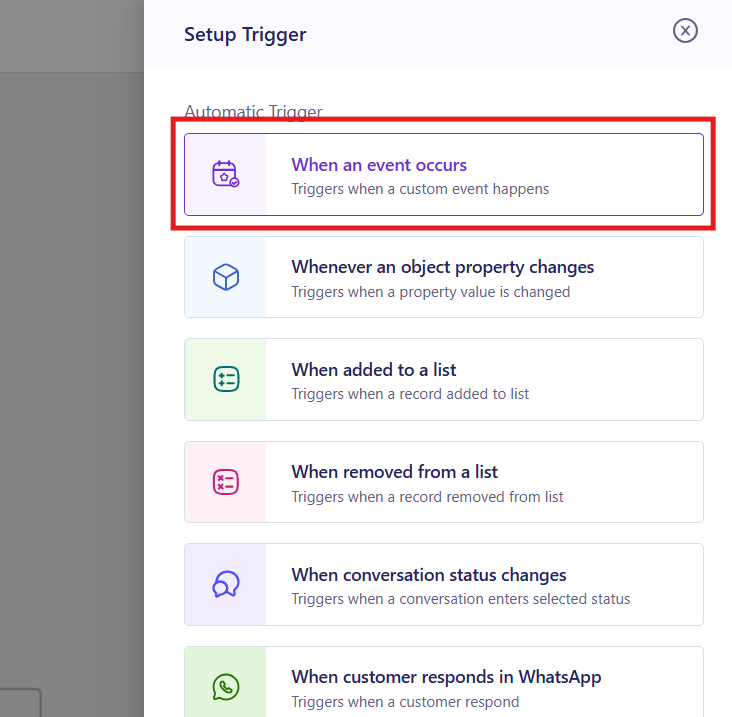
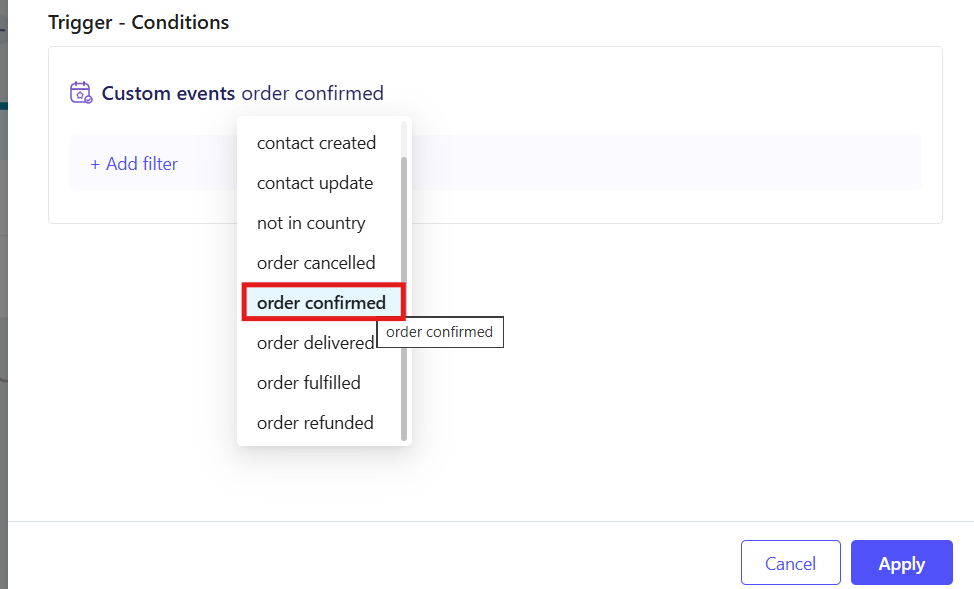
2. Open Flows and Set the Trigger: Navigate to Flows in the sidebar of the ZEPIC console, then set the trigger as a custom event and select Order Confirmed on your platform.
3. Customize Your Messages: Add a step for each channel you want to use, SMS, WhatsApp, or email, and customize the message with order details and personalization such as first name.
4. Choose Timing Across Channels: Send the confirmation on multiple platforms at once, or add a delay between channels if you want one message to follow the other.
5. Test and Launch: Trigger a test order, confirm each message arrives correctly, then publish the flow to your live audience.
What to Expect After Launch
Once your order confirmation journey is live, your business can reassure every customer the moment their order is placed.
Your team does not need to send confirmations by hand or check each order manually, meaning that every customer gets a timely message on the channel they prefer, while delivery tracking shows how each one performed.
Order Confirmation Use Cases for Your Business
- • Instant Multi-Channel Confirmation: A D2C skincare brand sends an SMS and a WhatsApp message at the same moment an order is confirmed, so the customer sees it wherever they check first.
- • Email as the Detailed Record: A fashion retailer sends an SMS confirmation immediately, then follows with a detailed email receipt a few minutes later for the customer's records.
- • Booking Confirmations for Travel: A travel agency confirms a booking by WhatsApp right away, then delays an email with the full itinerary until the booking is finalized.
- • Channel Based on Order Value: An electronics retailer sends a standard email confirmation for most orders, but adds an instant SMS for higher-value purchases that deserve a faster reassurance.
FAQs
Can I send the order confirmation on more than one channel at once?
Yes. You can send SMS, WhatsApp, and email together the moment the order is confirmed, or add a delay so one channel follows another.
Does this only work with Shopify?
No. Shopify is the most common source, but the same flow can trigger from any other webhook that sends an Order Confirmed event into ZEPIC.
Do I need coding experience to build this journey?
No. ZEPIC uses a visual Flow builder, so you can set the trigger, customize messages, and add delays without writing code.
Explore Related Articles
Was this article helpful?
That’s Great!
Thank you for your feedback
Sorry! We couldn't be helpful
Thank you for your feedback
Feedback sent
We appreciate your effort and will try to fix the article