ZEPIC Custom Reports – Features and Capabilities Overview
Custom Reports is the quickest way to ensure your team has the visibility they need and the flexibility to measure what actually matters to your business.
ZEPIC's Custom Reports feature helps with this.
With fully configurable dashboards and Reports, you can build the exact views your team needs, using live data and share your reports across your workspace, or keep them just for yourself.
Custom Reports Add-on
Custom Reports are available as a paid add-on for all ZEPIC plans. Each add-on pack includes 5 Boards, which can change based on the add-on you opt for, with up to 12 Reports per Board.
Pricing scales with your billing commitment, so teams that plan ahead pay less per month.
What You Can Do With ZEPIC Custom Reports
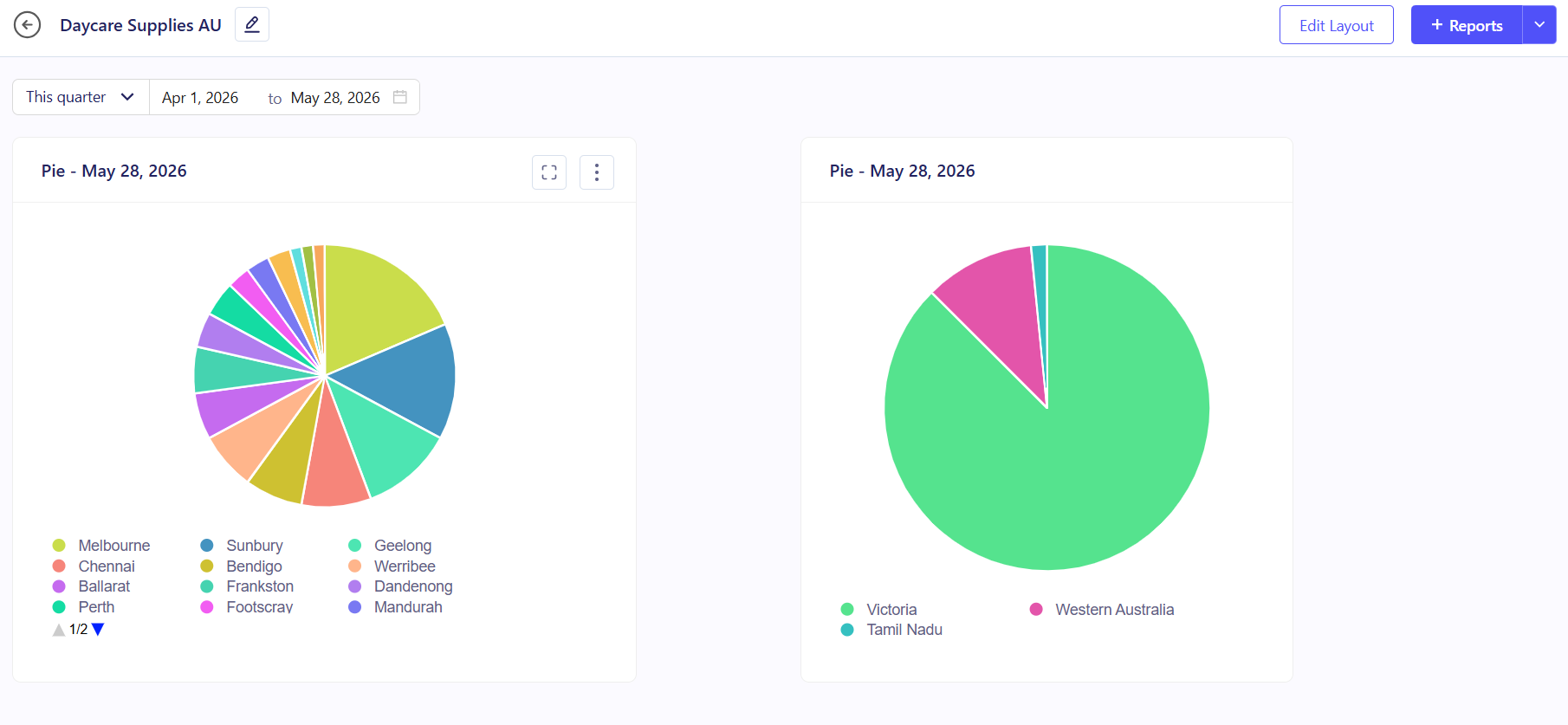
I. Dashboards and Reports
A Board is a page that can hold up to 12 Reports. Every Board has a date range picker at the top that updates all the Reports inside it at once, so you do not have to change each one separately.
You can make a Board Public so others on your team can see it, or Private so only you can access it.
Reports you have already made can be added to other boards as well, so you do not have to start over each time.
II. Visualization Types
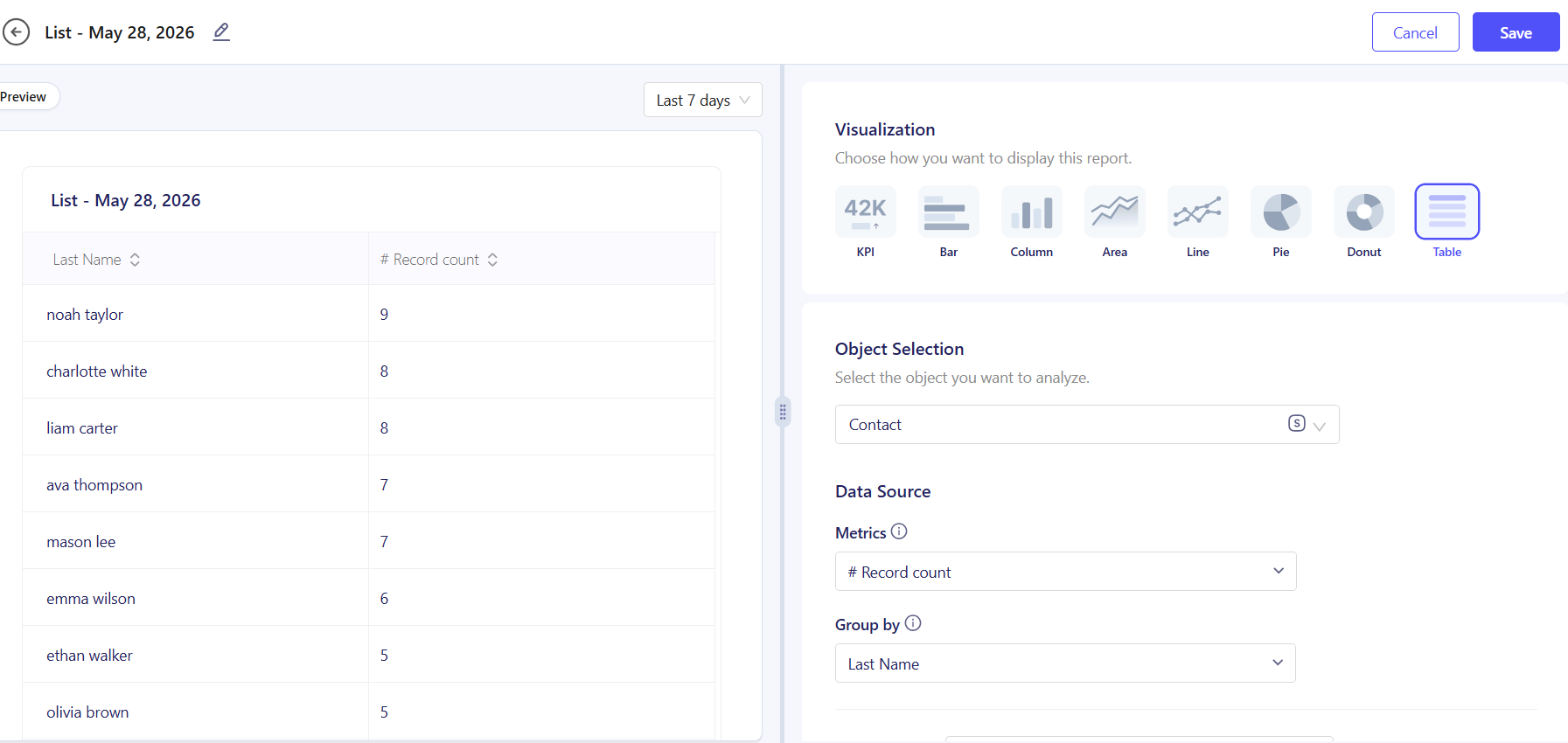
When you create a Report, you pick how the data is shown. There are eight options:
• KPI: Shows one big number, like total contacts or total revenue.
• Bar: Compares groups using horizontal bars.
• Column: Compares groups using vertical bars.
• Line: Shows how something changes over time.
• Area: Like a line chart, but fills in the space below the line.
• Pie: Shows how something is split across categories.
• Donut: Same as a pie chart in a ring format.
• Table: Shows your data in rows and columns.
III. Data Sources: Real-Time Data from Platforms and CSVs
Each Report pulls from one data source. You can pick a ZEPIC Object like a Contact, Order, or Deal, and then choose an activity tied to it, like an email being opened or an order being completed.
objectIn ZEPIC, you can also pull data from app platforms like CRMs, Shopify or WooCommerce using objects information like Contacts, Orders, and Deals.
You can also upload a CSV file if your data comes from outside ZEPIC, like results from another platform or an offline campaign. Both types of data can live in the same Board.
IV. Metrics and Group By for Custom Dashboards
Each Report lets you pick what to count or calculate and how to group the results.
If you are grouping by a date, you can choose to bucket results by Day, Week, Month, Quarter, or Year, and here’s how you can break them down further:
• Metrics are what you are measuring, such as a count of records, a total, or an average.
• Group By sorts your results into categories, for example, by country or by lifecycle stage.
• Breakdown by splits each category further, for example, by campaign name within each country.
V. Time Field and Date Range
Every Report needs a time field, either the date a record was created or the date it was last updated. This tells ZEPIC which date to use when the Board date range is changed.
You can pick from preset ranges like Last 7 Days, This Month, or Last Year, or set a custom range. When you change the date at the Board level, every Report updates automatically.
VI. Roles and Permissions
Access to Custom Reports is controlled at the Board level. If a user can see a Board, they can see all the Reports inside it.
If they cannot access the Board, none of the Reports inside are visible to them. Only Owners, Admins, and Managers can create and manage Boards and Reports. Everyone else can view them.
| Action | Owner | Admin | Manager | Author | Analyst | Support |
| Create, Update, Delete Boards | ✔ | ✔ | ✔ | ✖ | ✖ | ✖ |
| Create, Update, Delete Reports | ✔ | ✔ | ✔ | ✖ | ✖ | ✖ |
| View Boards and Reports | ✔ | ✔ | ✔ | ✔ | ✔ | ✔ |
Did this article help you understand Custom Reports in ZEPIC? Let us know!
```
Was this article helpful?
That’s Great!
Thank you for your feedback
Sorry! We couldn't be helpful
Thank you for your feedback
Feedback sent
We appreciate your effort and will try to fix the article