How to send WhatsApp Broadcast messages safely and effectively
WhatsApp Broadcasts are one of the most powerful tools for businesses looking to drive immediate action. To help with this, ZEPIC provides the framework to execute compliant and high-impact broadcasts.
High-quality, compliant broadcasts lead to high open rates, better conversion, and a protected sender reputation.
How to deliver a message to everyone without being blocked
Safe broadcasting solves critical deliverability and reputation pain points:
- Spam Prevention: Using compliant methods prevents high block rates, which protects your essential message quality rating and sending limits.
- High Engagement: Targeting only opted-in users ensures your message is relevant, leading to higher conversion rates than general email blasts.
- Compliance Assurance: Ensures your campaigns meet Meta’s strict rules, preventing account suspension or service disruption.
Step-by-step guide: Sending a safe Broadcast on WhatsApp
Follow these steps to ensure every broadcast is compliant, segmented, and professional.
Step 1: Create a WhatsApp campaign on ZEPIC
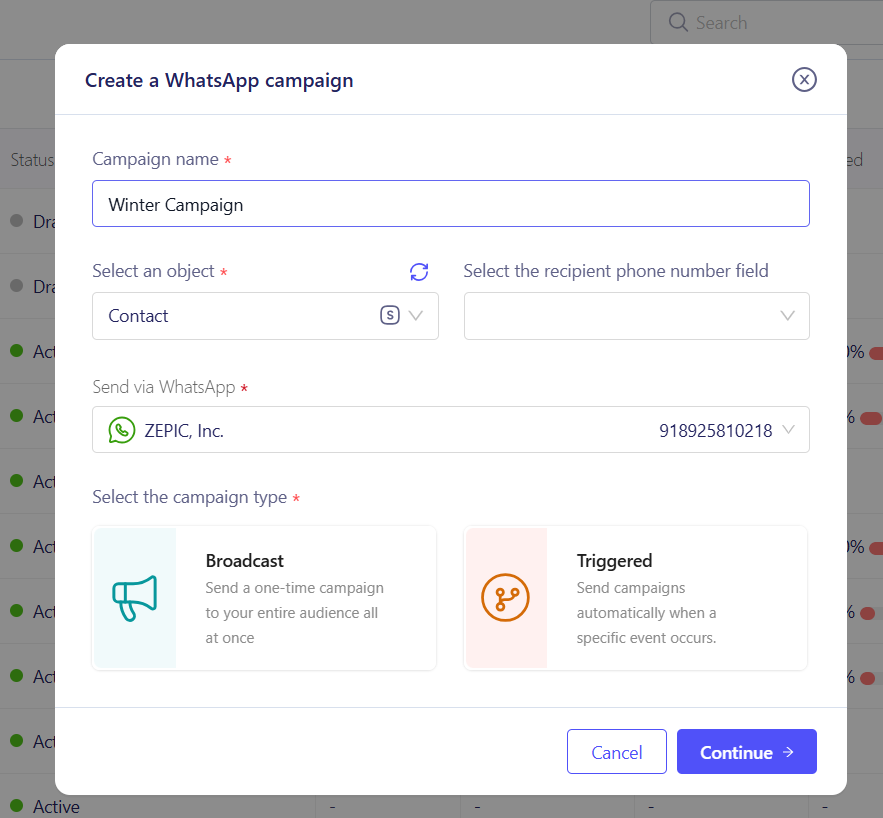
Go to the campaign setting of setting. Name your WhatsApp campaign and select broadcast as the type of campaign you want. Before this, you must ideally have the customer’s clear permission to receive messages on WhatsApp.
- Mandatory Action: Collect explicit consent via a third-party channel (website form, app registration, or point-of-sale).
- Best Practice: Clearly state what the user is opting in to receive (e.g., "Yes, send me promotional updates on WhatsApp").
Step 2: Create and approve the template message (HSM)
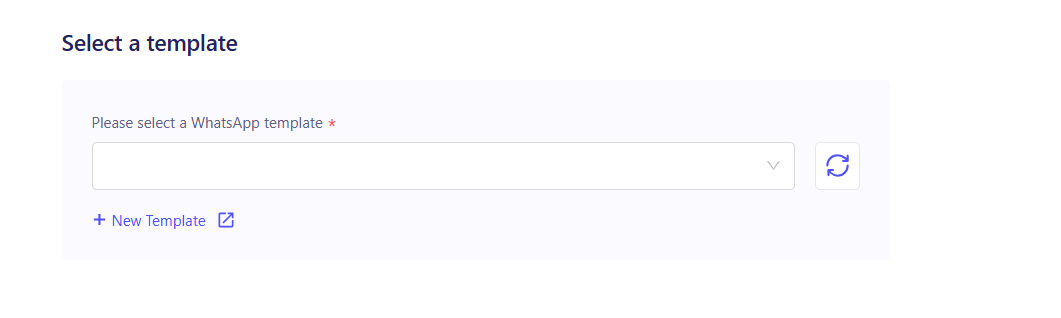
All proactive, bulk messages must use a pre-approved Template Message. So for you can either select a pre-approved WhatsApp template or create one from scratch by:
- Start navigating to the Templates section and design your message content (e.g., a flash sale announcement).
- Submit the template for Meta Review. Approval ensures your content is compliant and ready for bulk use. - We go over the full process in our How to Create WhatsApp Templates article.
Step 3: Select your audience in ZEPIC
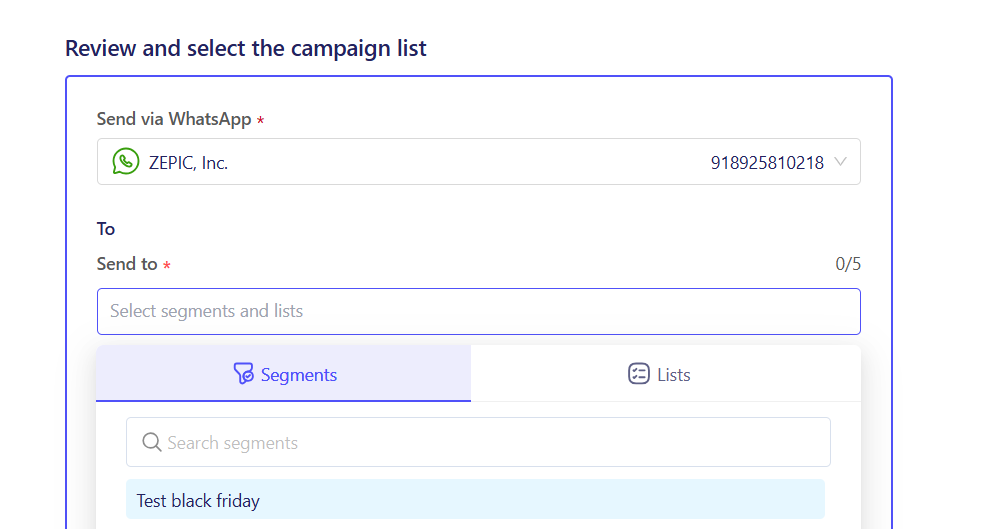
Never send a broadcast to your entire list of contacts. Highly targeted campaigns drive better results and lower block rates.
- With Segments or Lists, you can filter out your audience based on consent, purchase history, CTWA tags, or location.
- Example Segment: Users who opted in and browsed the "Footwear" category in the last 30 days. We covered how to create segments and how to create lists to help you get a better idea if you’re new to it.
Step 4: Execute the Broadcast campaign
Launch the message using the approved template to the segments or lists of users. After a quick review of the Campaign.
- Save or Send: Set the campaign to launch immediately or schedule/save it to be sent later at an optimal time after review.
- Monitor Quality: Closely monitor the delivery, read, and block rates in your ZEPIC campaign analytics post-send.
Benefits of compliant Broadcasting
| Outcome | Your business advantage |
| High Open Rates | WhatsApp generally sees 4x higher open rates than email, providing an unmatched delivery vehicle for urgent messaging. |
| Protected Reputation | Low block rates safeguard your quality rating, allowing you to maintain your top-tier sending limits for future campaigns. |
| Increased Conversions | Sending personalized, relevant messages only to opted-in users drastically increases the conversion rates achieved directly from the broadcast. |
Would you like to review the specific guidelines for the Opt-in requirements?
Was this article helpful?
That’s Great!
Thank you for your feedback
Sorry! We couldn't be helpful
Thank you for your feedback
Feedback sent
We appreciate your effort and will try to fix the article