Best practices for WhatsApp opt-in, consent, and compliance
Meta has strict policies regarding consent (opt-in) to ensure users are protected from spam.
Failing to secure proper, documented consent is the primary reason businesses are penalized, resulting in low-quality ratings, reduced sending limits, and account suspension.
This guide outlines the mandatory best practices for collecting and managing customer opt-ins. Compliant opt-in and opt-out options directly correlate with low block rates and high message quality, which maximizes your campaign reach.
WhatsApp opt-in for clear, documented, and compliant consent
Proper consent management solves key operational and legal pain points:
- Reputation protection: Only messaging users who explicitly asked for your content drastically reduces block rates, keeping your sender reputation "Green."
- Legal safety: Provides a clear audit trail proving you have the necessary consent, protecting your business from potential policy enforcement actions by Meta.
- Engagement quality: Targeting an audience that wants your messages leads to higher conversion rates than blanket sending.
The three golden rules of WhatsApp opt-in
Meta requires compliance with three non-negotiable standards:
1. Explicit opt-on is mandatory
The customer must clearly and actively agree to receive messages from your business over WhatsApp.
- Acceptable methods: A clearly labeled checkbox, a confirmation button, or a documented verbal agreement (for voice channels).
- Unacceptable methods: Pre-checked boxes, implied consent from a purchase, or a general privacy policy acceptance.
2. Clear value proposition
The customer must understand what they are signing up for, including the type of content they will receive and the frequency.
- Required disclosure: The opt-in text must clearly state that messages will be sent via WhatsApp and include your business name.
- Content type: Specify if they will receive "Order Updates," "Promotional Offers," or "General News."
3. Easy opt-out mechanism
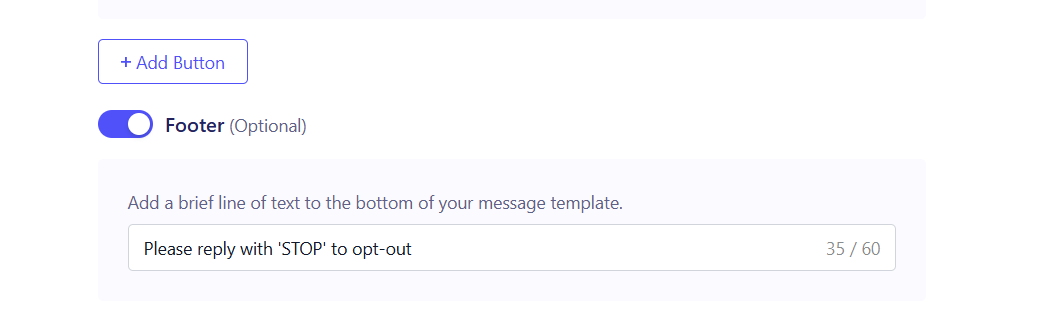
In WhatsApp campaigns, you can add an opt-out option for users when creating your template before sending it for approval from Meta. The user must have a simple, friction-free way to withdraw consent at any time.
- Mandatory instruction: Every message should include clear instructions on how to opt out (e.g., "Reply STOP to unsubscribe").
- Immediate compliance: ZEPIC automatically processes and updates these opt-out requests instantly, ceasing all further communication to that number.
Best practices for collecting and managing opt-in on ZEPIC
Use these techniques to integrate consent collection into your standard marketing flows:
| Scenario | Best Practice for Consent Collection | ZEPIC Action |
| Website Forms | "Yes, I agree to receive marketing messages on WhatsApp." | The form submission should update the contact's consent status/property in ZEPIC's CRM. |
| In-Chat (Customer Initiated) | If a customer messages for support, a bot or agent must ask: "Would you like to opt in for our latest promotions? Reply YES to opt-in." | If the user replies YES, the agent manually updates the contact's consent status tag in the Team Inbox. |
| CTWA Ads | The ad creative and copy must clearly state the message will start on WhatsApp. The user clicking the button is sufficient for the first message only. | Immediately after the first message, a bot/agent must send a follow-up asking for explicit ongoing promotional consent. |
Would you like to review how to see how to improve your WhatsApp messaging limits and quality score in ZEPIC?
Was this article helpful?
That’s Great!
Thank you for your feedback
Sorry! We couldn't be helpful
Thank you for your feedback
Feedback sent
We appreciate your effort and will try to fix the article