Troubleshooting deliverability issues on WhatsApp via ZEPIC
When WhatsApp messages do not reach your users, it is often due to template rejections, account restrictions, or technical errors.
While this can be frustrating, knowing the cause is the only way to get your campaign back on track without hurting your sender reputation.
ZEPIC provides logs and status indicators that tell you exactly why a message failed to send. Here is how you find and fix these issues.
Step-by-Step Guide: Finding and Fixing Delivery Failures
Step 1: Check the Message Status in ZEPIC
• Go to your WhatsApp Campaign report and look at the Failed or Undelivered metrics.
• Click on the error details to see the specific Error Code provided by Meta.
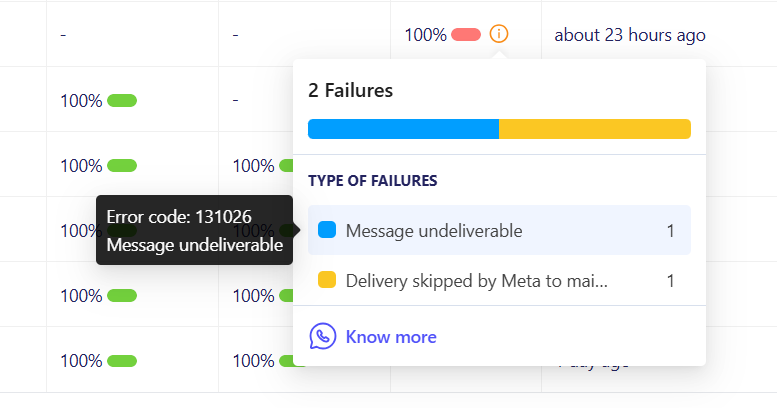
Step 2: Verify Your Number and Account Status
• Check your Phone Number Status in the ZEPIC connector settings. If it says "Flagged" or "Disconnected," delivery will stop.
• Ensure your Meta Business Manager has a verified payment method for any messaging fees.
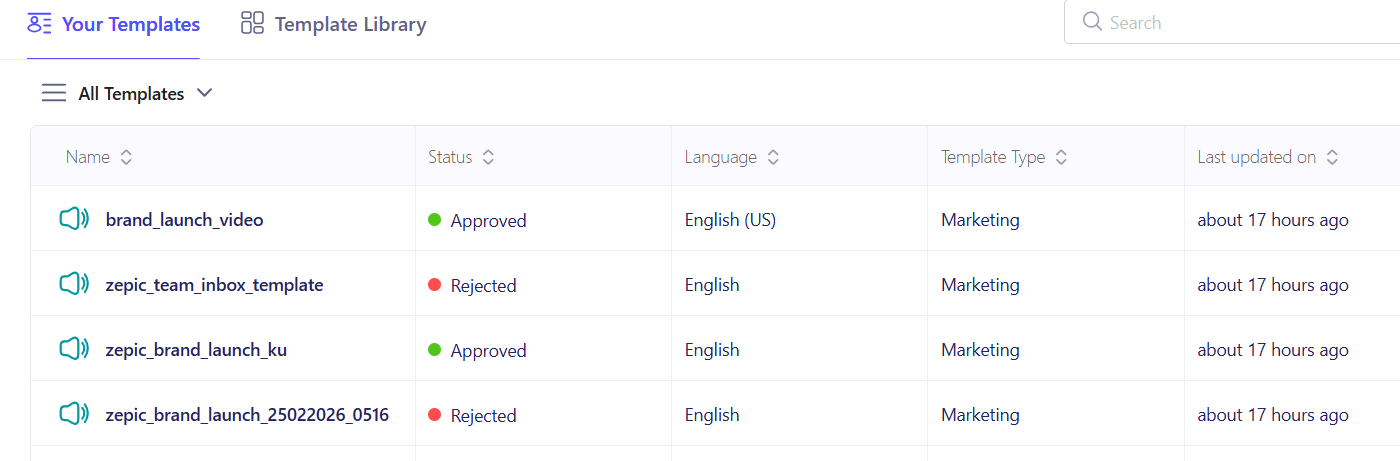
Step 3: Review Template Approval and Logic
• Confirm that the template status is Approved. If it is "Paused" or "Rejected," you must resubmit.
• Check your Dynamic Variables. If a placeholder (like {{1}}) is missing data, the message may fail.
Common WhatsApp Error Codes and Solutions
| Error Type | Likely Cause | How to Fix |
|---|---|---|
| 131030 | Template not approved or paused. | Check status in Meta and appeal or wait. |
| 131026 | Message limit reached. | Wait for the 24-hour cycle to reset. |
| 131042 | User block or no opt-in. | Remove user from list. |
| 131051 | Payment issue in Meta. | Verify billing in Meta dashboard. |
Account and Payment Status Errors
| 131031 | Account Locked | Review the Meta "Account Quality" page. |
| 368 | Temporary Block | Stop all sends for 24 hours to clear flag. |
Throttling and Sending Limits
• Code 131048 (Spam Rate Limit): Your number is restricted due to high "Report Spam" clicks. Lower your frequency.
• Code 130429 (Throughput Limit): You are sending faster than your tier allows. ZEPIC will usually retry these.
• Code 80007 (Tier Limit Hit): Daily limit reached (e.g., 1k or 10k users). Wait 24 hours to resume.
Fixing delivery problems immediately helps minimize campaign downtime, protects your sender status, and ensures order updates or OTPs arrive on time. If you see Error 131000 ("Something went wrong"), wait 5 minutes and try a test send before contacting support.
Want to know more about using WhatsApp on ZEPIC? Check out some of our other articles!
Was this article helpful?
That’s Great!
Thank you for your feedback
Sorry! We couldn't be helpful
Thank you for your feedback
Feedback sent
We appreciate your effort and will try to fix the article